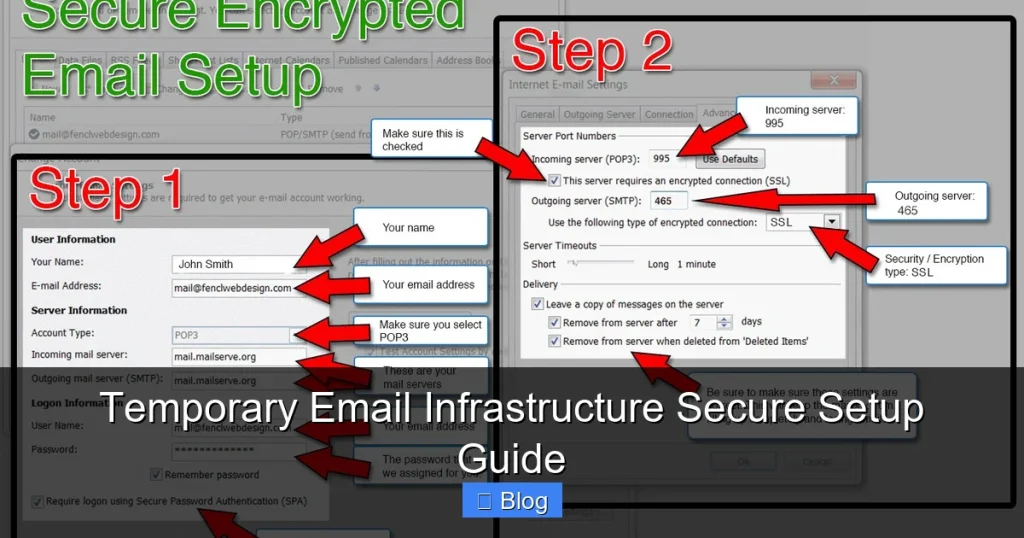

Temporary email infrastructure shields your primary inbox from spam and phishing threats while preserving anonymity online. This guide reveals how to implement a secure, reliable disposable email system without compromising your digital safety or workflow efficiency.
Key Takeaways
- Security First: Always encrypt connections (TLS/SSL) and authenticate API access to prevent email interception or hijacking.
- Controlled Lifespan: Set strict expiration rules (e.g., 1-24 hours) for temporary addresses to minimize attack surfaces.
- Reputation Management: Monitor sender scores and avoid blacklists by implementing SPF/DKIM for your temp email domain.
- Seamless Integration: Use webhooks and APIs to connect temporary email services with your existing tools like CRM or support platforms.
- User Education: Train teams on safe usage—never use temp emails for sensitive accounts like banking or primary communications.
- Regular Audits: Review logs monthly to detect abuse patterns and update security protocols proactively.
📑 Table of Contents
- Why Your Inbox Deserves a Bodyguard: The Temporary Email Revolution
- What Exactly Is Temporary Email Infrastructure?
- The Hidden Risks of a Shoddy Setup
- Building Your Secure Temporary Email Infrastructure: A Step-by-Step Guide
- Integrating Temp Email Infrastructure into Your Workflow
- Maintenance: Keeping Your Infrastructure Healthy
- The Future of Temporary Email: Trends to Watch
- Conclusion: Your Inbox, Reclaimed
Why Your Inbox Deserves a Bodyguard: The Temporary Email Revolution
Let’s be honest: your primary email address is probably drowning in spam, phishing attempts, and promotional chaos. You’ve shared it everywhere—from that sketchy coupon site to your favorite streaming service. Each click risks exposing your real identity to data brokers and cybercriminals. Enter temporary email infrastructure: your digital bodyguard for online interactions. It’s not just about dodging newsletters; it’s a strategic shield for privacy-conscious individuals and businesses alike.
Imagine signing up for a new app without handing over your lifelong email. Picture verifying a one-time purchase while keeping your inbox pristine. Temporary email infrastructure makes this possible by generating disposable addresses that self-destruct after use. But here’s the catch: a poorly configured system can backfire spectacularly. If your “temporary” setup leaks data or gets blacklisted, you’re worse off than before. That’s why security isn’t optional—it’s the foundation. In this guide, we’ll cut through the noise and show you how to build a temporary email infrastructure that’s both powerful and bulletproof.
What Exactly Is Temporary Email Infrastructure?
Temporary email infrastructure refers to a system that creates short-lived, disposable email addresses for specific tasks. Unlike permanent aliases, these addresses automatically expire after a set time or action—like verifying a sign-up or receiving a password reset. Think of it as a burner phone for your inbox: useful for a single mission, then gone.

Visual guide about Temporary Email Infrastructure Secure Setup Guide
Image source: images.template.net
How It Differs from Regular Disposable Emails
Many free services (like 10MinuteMail) offer temporary emails, but they’re often unreliable and insecure. True infrastructure goes further:
- Custom Domains: Use your own domain (e.g., temp.yourbusiness.com) instead of public services, boosting trust and control.
- API-Driven: Integrate with your apps via APIs for automated address generation and management.
- Enterprise-Grade Security: Features like end-to-end encryption and audit logs missing in free tools.
For example, a developer might use temporary email infrastructure to test sign-up flows without flooding their real inbox. A marketing team could deploy it for lead capture campaigns, ensuring customer emails don’t get mixed with internal communications.
Real-World Use Cases You Can’t Ignore
Temporary email infrastructure shines in scenarios where privacy and efficiency collide:
- User Onboarding: Generate unique temp emails for each new user during sign-up. Once verified, migrate them to your main system.
- Secure File Sharing: Send sensitive documents to a temp address that expires after 24 hours—no more “forgot to revoke access” nightmares.
- Competitor Research: Sign up for rival services anonymously without revealing your company domain.
- IoT Device Management: Give smart devices temporary emails for firmware updates, reducing long-term exposure.
Picture this: You’re launching a beta app. Instead of asking testers for personal emails, you assign each a custom temp address (beta123@temp.yourstartup.com). After the beta ends, all addresses auto-delete. No spam. No data leaks. Just clean, focused feedback.
The Hidden Risks of a Shoddy Setup
Building temporary email infrastructure isn’t hard—but building it securely is where most fail. Skip these steps, and you’re not just inviting spam; you’re handing attackers a master key to your digital life.
When “Temporary” Becomes Permanent Damage
Consider these horror stories:
- A startup used a free temp email service for customer support. When the service shut down, all support tickets vanished—along with client trust.
- An e-commerce site’s temp email domain got blacklisted after spammers abused it. Legitimate order confirmations ended up in spam folders, killing sales.
- A developer hardcoded API keys in a public GitHub repo. Hackers scraped them and sent 50,000 phishing emails from the company’s temp domain.
These aren’t hypotheticals. They’re consequences of ignoring security fundamentals. Your temporary email infrastructure must prioritize:
- Data Minimization: Never store full email content longer than necessary.
- Access Controls: Restrict who can create/delete addresses.
- Reputation Safeguards: Monitor blacklists and sender scores daily.
The Cost of Cutting Corners
Let’s talk numbers. A single blacklisted domain can cost businesses $150,000+ in lost revenue (per Return Path data). And if temp emails leak user data? GDPR fines hit 4% of global revenue. But the real price is intangible: eroded customer trust. When users realize their “disposable” email was actually permanent and exposed, they’ll flee—and tell everyone why.
Don’t gamble with your reputation. Treat temporary email infrastructure like the critical asset it is.
Building Your Secure Temporary Email Infrastructure: A Step-by-Step Guide
Ready to create a system that’s both flexible and fortress-like? Follow this battle-tested framework. We’ll use open-source tools like Mailu or Postal for transparency, but the principles apply to any solution.
Phase 1: Laying the Foundation
Choose Your Domain Wisely
Never use your primary domain (e.g., @yourcompany.com) for temp emails. Create a subdomain like temp.yourcompany.com or verify.yourcompany.com. This isolates risks—if the temp domain gets blacklisted, your main domain stays clean.
Set Up DNS Records Correctly
This is non-negotiable for deliverability:
- SPF: Authorize your temp email server to send mail. Example:
v=spf1 mx a include:_spf.temp.yourdomain.com ~all - DKIM: Sign outgoing emails to prove they’re legit. Generate a 2048-bit key.
- DMARC: Set policy to
p=quarantineto catch spoofing attempts.
Test records using tools like MXToolbox. A misconfigured SPF can sink your sender reputation before you send a single email.
Phase 2: Core Security Configurations
Enforce TLS Everywhere
Require TLS encryption for all incoming/outgoing mail. In Mailu, set TLS_FLAVOR=modern to disable weak protocols. Without this, emails can be intercepted in transit—like sending postcards instead of sealed letters.
Implement Rate Limiting
Spammers love open relays. Throttle requests:
- Max 5 new addresses per user per hour
- Max 50 emails per address before auto-deletion
In Postal, configure this under Settings > Security > Rate Limits. This stops bots from flooding your system.
Enable Authentication for APIs
If your infrastructure talks to other apps (e.g., your CRM), secure those connections:
- Use OAuth 2.0 or API keys with short lifespans (rotate every 90 days).
- Restrict API access to specific IP ranges.
Example: A webhook that creates temp emails for new Shopify orders should only accept requests from Shopify’s IPs.
Phase 3: Lifecycle Management
Define Expiration Rules
Not all temp emails need the same lifespan:
- Verification Emails: Expire after 1 hour (e.g., for sign-ups).
- Support Tickets: Expire after 7 days (allowing follow-ups).
- File Shares: Expire after 24 hours.
In Mailu, use the MESSAGE_EXPIRY environment variable. For granular control, build custom logic with webhooks—e.g., delete an address after the first email is read.
Automate Cleanup
Schedule daily cron jobs to purge expired addresses. Leftover data is a breach waiting to happen. Log all deletions for audit trails.
Monitor Relentlessly
Track:
- Blacklist status (use MXToolbox)
- Spam complaint rates (aim for <0.1%)
- Failed login attempts
Set up Slack alerts for anomalies. If spam complaints spike, investigate immediately—your temp domain might be compromised.
Integrating Temp Email Infrastructure into Your Workflow
A secure setup is useless if it doesn’t play nice with your existing tools. Here’s how to weave it into your daily operations.
For Developers: API-First Implementation
Most modern temp email services offer REST APIs. Example flow for user sign-up:
- Frontend requests a new temp email via
POST /api/temp-emails - Backend creates address (e.g., user123@temp.yourdomain.com) with 1-hour expiry
- Verification email sent to that address
- User clicks link → backend migrates account to permanent email
- Temp address auto-deletes
Use webhooks to notify your app when emails arrive. In Node.js:
app.post('/webhook/email', (req, res) => {
  const { to, subject } = req.body;
  if (to.includes('@temp.yourdomain.com')) {
    // Process verification link
    deleteTempEmail(to); // Cleanup after use
  }
});
Always validate webhook signatures to prevent spoofing.
For Marketing & Sales Teams
Temp emails excel at lead generation:
- Create unique temp addresses for each campaign (e.g., webinar@temp.yourdomain.com).
- Track engagement: If no email arrives in 24 hours, the lead is unresponsive.
- After conversion, move contacts to your main ESP.
Tools like Mailchimp can forward campaign replies to temp addresses. Set up auto-responses: “Thanks! We’ll contact you at your permanent email shortly.”
Pro Tip: Never use temp emails for cold outreach. Recipients will mark them as spam—hurting your sender score.
For Customer Support
Replace public support emails (e.g., support@yourcompany.com) with dynamic temp addresses:
- When a user submits a ticket, generate ticket-789@temp.yourdomain.com.
- All correspondence routes through this address.
- After resolution, archive the thread and delete the temp address.
This prevents ticket hijacking and keeps your main support inbox focused on active cases. Zendesk and Freshdesk support this via APIs.
Maintenance: Keeping Your Infrastructure Healthy
Security isn’t a one-time setup. Treat your temporary email infrastructure like a living system that needs constant care.
Monthly Security Audits
Schedule these checks:
- Log Review: Scan for unusual patterns (e.g., 100 address creations from one IP).
- Key Rotation: Change API keys, DKIM secrets, and TLS certificates.
- Blacklist Scan: Verify your temp domain isn’t on Spamhaus or SORBS.
- User Permissions: Revoke access for departed employees.
Automate where possible. Use Fail2ban to block brute-force attacks on your email server.
Scaling Without Sacrificing Security
As your user base grows, avoid these pitfalls:
- Don’t over-provision: Start with 100 temp addresses/user. Increase only if needed.
- Isolate high-risk traffic: Use separate subdomains for public sign-ups vs. internal tools.
- Load test: Simulate 1,000 concurrent sign-ups to ensure your server doesn’t crash.
Cloud services like AWS SES can handle volume spikes, but configure dedicated IPs to protect sender reputation.
When to Sunset Your Infrastructure
Temporary email isn’t for everything. Retire it when:
- You need long-term communication (e.g., newsletters).
- Regulations require email retention (e.g., FINRA for finance).
- Users demand permanent addresses (e.g., enterprise SSO).
Always provide a migration path. Example: “Your temp email expires in 48 hours. Add a permanent address to keep accessing your account.”
The Future of Temporary Email: Trends to Watch
Temporary email infrastructure is evolving fast. Stay ahead with these insights:
- AI-Powered Filtering: Tools like Abine are using machine learning to auto-delete spammy temp emails before they hit your server.
- Blockchain Verification: Projects like Dmail are exploring decentralized temp emails with cryptographic proof of deletion.
- Regulatory Shifts: GDPR “right to be forgotten” rules will push more businesses toward auto-expiring emails.
Within 2 years, expect temp email APIs to become as common as payment gateways. The winners will be those who treat privacy as a feature—not an afterthought.
Conclusion: Your Inbox, Reclaimed
Temporary email infrastructure isn’t just a privacy hack; it’s a strategic advantage. By implementing it securely, you transform email from a vulnerability into a controlled asset. No more inbox anxiety. No more spam avalanches. Just clean, intentional communication.
Remember: security is the price of admission. Skip the TLS, ignore the blacklists, or hardcode your API keys, and you’ll pay in breaches and broken trust. But follow this guide—domain isolation, strict lifespans, relentless monitoring—and you’ll build a system that’s both powerful and pristine.
Your primary email address is precious. Guard it like the digital identity it is. Start small: set up a temp subdomain today for your next sign-up flow. In a week, you’ll wonder how you ever lived without it. Ready to take control? Your inbox—and your peace of mind—will thank you.
Frequently Asked Questions
Is temporary email infrastructure legal?
Yes, when used ethically. It’s legal for privacy protection, testing, and legitimate business processes. Avoid using it for fraud, spam, or evading platform terms of service—that’s where legal risks begin.
Can I recover emails sent to a temporary address?
Generally no—that’s the point! Emails are typically accessible only while the address is active (e.g., via a web interface). Once expired, they’re permanently deleted. Always forward critical messages to a permanent address first.
How long should temporary email addresses last?
It depends on the use case: 1 hour for sign-up verifications, 24-72 hours for file shares, or up to 7 days for support tickets. Shorter lifespans reduce security risks but balance usability.
Will temporary emails affect my sender reputation?
Only if misconfigured. Using your own domain with proper SPF/DKIM/DMARC protects your main domain’s reputation. Never use public temp email services for business communications—they’re often blacklisted.
Can spammers abuse my temporary email infrastructure?
Yes, if security is weak. Prevent abuse with rate limiting, CAPTCHAs for address creation, and strict expiration rules. Monitor logs for suspicious activity like bulk address generation.
Do I need technical skills to set this up?
Basic server/admin knowledge helps, but managed services (like AnonAddy or SimpleLogin) simplify deployment. For custom setups, follow step-by-step guides—many open-source tools have detailed documentation.