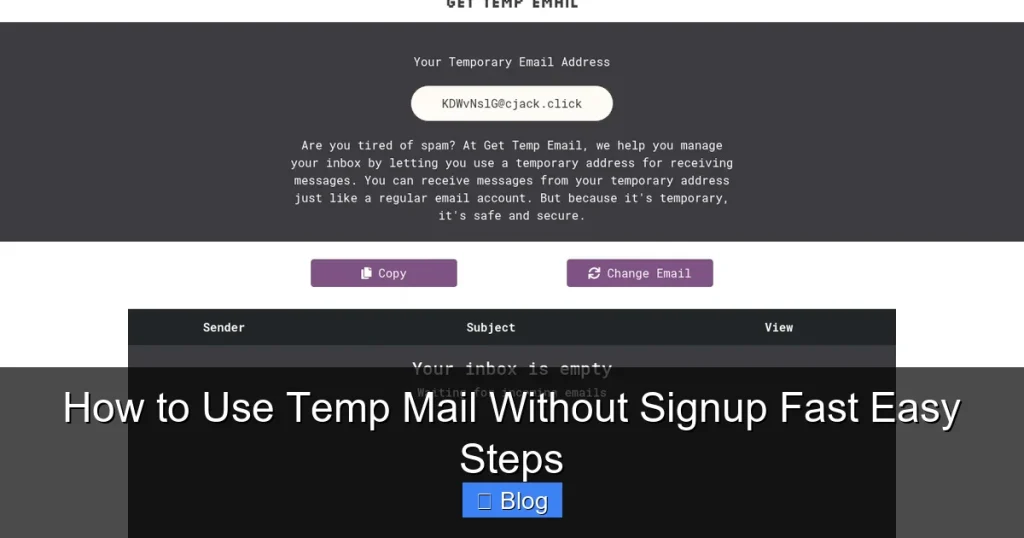

Skip the signup hassle! Get a temporary email address instantly with zero registration—just visit a temp mail site, copy your disposable address, and use it for signups. Protect your inbox from spam while verifying accounts in seconds, no personal info required.
Key Takeaways
- Skip signup completely: Generate disposable emails instantly without account creation.
- Use for spam-free verifications: Protect your main inbox during one-time signups or trials.
- Access emails directly online: Check messages instantly on the temp mail service’s website.
- Emails expire automatically: Addresses self-delete after hours/days—ideal for short-term use.
- No personal data required: Maintain privacy by avoiding real email exposure.
- Choose reputable providers: Prioritize trusted services for reliable inbox functionality.
📑 Table of Contents
- How to Use Temp Mail Without Signup Fast Easy Steps
- What Exactly Is Temp Mail Without Signup?
- Why Bother with Temp Mail Without Signup? (The Real Benefits)
- Your Stress-Free Guide: Using Temp Mail Without Signup in 5 Minutes
- Top Temp Mail Services That Don’t Ask for Your Soul (Or Signup)
- Temp Mail Without Signup: The Sneaky Pitfalls You Must Avoid
- Level Up Your Temp Mail Game: Pro Tips Most People Miss
- Wrapping Up: Your Inbox, Your Rules
How to Use Temp Mail Without Signup Fast Easy Steps
Hey there! Remember that time you signed up for a “free” webinar or a shiny new app, only to drown in a tsunami of promotional emails the next day? Yeah, me too. I’ve been there—clicking “I agree” without reading the fine print, handing over my real email like it’s no big deal. Before I knew it, my inbox was a chaotic mess of spam, and I felt like my privacy had been hijacked. Sound familiar? If you’ve ever wished for a magic trick to sign up for stuff without sacrificing your real email address, you’re in the right place. That’s where temp mail without signup comes in—a lifesaver for anyone who values their inbox sanity.
Temp mail without signup is exactly what it sounds like: a disposable email address you can use instantly, no registration required. Think of it as a disposable coffee cup for your digital life—grab it when you need it, use it once, and toss it when you’re done. No strings attached, no “create an account” hoops to jump through. I first stumbled onto this gem when I needed to download a free ebook but didn’t want the author’s newsletter clogging my inbox. One click, a temporary address popped up, and boom—problem solved. Since then, I’ve used it for everything from testing beta apps to signing up for flash sales. And the best part? It takes less time than brewing your morning coffee. Let’s dive into how you can do the same—fast, easy, and without signing up for anything.
What Exactly Is Temp Mail Without Signup?
Let’s clear up the confusion right away. Temp mail without signup isn’t some shady hack or complex tech wizardry. It’s a simple service that generates a random, temporary email address for you—on the spot—without asking for your name, password, or even an email to “verify” you. You visit a website, and bam, you’ve got a fresh disposable inbox ready to go. No forms, no waiting, no “confirm your email” loops. It’s like walking into a coffee shop, grabbing a cup, and leaving without ever talking to the barista.
Visual guide about How to Use Temp Mail Without Signup Fast Easy Steps
Image source: media.excellentwebworld.com
The Magic of Disposable Emails
So, how does this magic work? Temp mail services run on servers that create random email addresses (like bluecat42@tempmail.org) the moment you land on their site. These addresses are linked to a temporary inbox that lives for a set time—usually 10 minutes to 24 hours—before vanishing into the digital ether. When someone sends an email to that address, it pops up in your temp inbox. You can read it, reply (if the service allows), or ignore it. Once the timer runs out? Poof. The address is gone forever. No traces left in your real inbox. It’s perfect for those “just this once” moments when you need an email but don’t want the aftermath.
How It Works (Without Lifting a Finger)
Here’s the beautiful part: using temp mail without signup requires zero effort. Forget about creating accounts or remembering passwords. You don’t even need to think about security questions. Here’s what happens in real-time:
- You visit a temp mail website (more on my favorites later).
- The site auto-generates a random email address—no button clicks needed.
- You copy that address and paste it wherever you need an email (like a signup form).
- If someone replies, you check the temp inbox right there on the site.
- When you’re done, you close the tab. The address self-destructs.
It’s that simple. I once used it to sign up for a free trial of a project management tool. The company sent a confirmation email to my temp address, I clicked the link in the temp inbox, and I was in. No spam, no follow-ups—just a clean, one-time interaction. If you’ve ever felt uneasy about handing over your real email, this is your guilt-free escape hatch.
Why Bother with Temp Mail Without Signup? (The Real Benefits)
Okay, I get it—you might be thinking, “Is this really worth my time?” Short answer: absolutely. In a world where your email address is as valuable as gold to marketers, temp mail without signup is your digital bodyguard. It’s not just about avoiding spam (though that’s huge). It’s about taking back control of your online life. Let me break down why this little trick has become my go-to for almost everything.
Dodge the Spam Tsunami
Let’s be real: the moment you share your real email, you’re signing up for a lifetime of “exclusive offers” and “you won’t believe this!” emails. I once signed up for a free recipe PDF and ended up on 17 different mailing lists. My inbox became a graveyard of unread promotions. With temp mail without signup, you sidestep this entirely. That free webinar? Use a temp address. The limited-time discount? Temp address. The random forum signup? You guessed it—temp address. When the spam starts rolling in, it goes straight to your disposable inbox, not your personal one. I’ve saved myself hundreds of unwanted emails this way, and my real inbox stays peaceful. It’s like having a bouncer for your digital doorstep.
Keep Your Real Inbox Sacred
Your primary email is for important stuff: bank alerts, family updates, work communications. It’s not a dumping ground for “50% off cat sweaters” newsletters. Temp mail without signup helps you protect that sacred space. By using disposable addresses for low-stakes signups, you ensure your real inbox only shows what truly matters. I treat my personal email like a VIP lounge—only the essentials get in. Everything else? Redirected to temp mail. This isn’t just about convenience; it’s about mental clarity. When your inbox isn’t overflowing, you’re less stressed and more focused. Trust me, your future self will thank you.
Test Services Risk-Free
Ever wanted to try a new app or website but weren’t ready to commit? Temp mail without signup is your risk-free testing ground. Sign up for that beta version of a productivity tool, download that free resource, or join that niche forum—all without linking your real identity. If you love it, great! You can switch to your real email later. If it’s a dud? No harm done. The temp address expires, and you move on. I used this trick recently to test a new AI writing tool. The signup required an email, but I wasn’t sure if I’d keep using it. Temp mail let me explore freely. Spoiler: I didn’t love it, and I never heard from them again. Win-win.
Your Stress-Free Guide: Using Temp Mail Without Signup in 5 Minutes
Ready to try it? I promise this is easier than assembling IKEA furniture. No signup, no fuss—just pure, simple steps. I’ll walk you through the entire process using one of my favorite services (more on that later). By the end, you’ll be a temp mail pro. Let’s get started!
Step 1: Pick Your Temp Mail Hero
First, you need a reliable temp mail service. Not all are created equal—some have annoying ads, short expiration times, or shady practices. Stick with trusted names like TempMail.org, 10MinuteMail, or Guerrilla Mail. These are free, no-signup, and user-friendly. I usually go with TempMail.org because it’s fast and has a clean interface. Open your browser, type in the URL, and hit enter. That’s it—no downloads, no apps, nothing.
Step 2: Generate Your Disposable Address (Seriously, It’s One Click)
Once the site loads, you’ll see a random email address already generated for you—something like happyfox73@tempmail.org. No need to click “Generate” or “Create.” It’s ready to go! If you want a custom address (some services allow this), look for a “Custom” or “Edit” option. But honestly, the random ones work just fine. I’ve never needed a custom address, and it saves time. Simply click the copy button next to the address (it usually looks like two overlapping squares), and it’s saved to your clipboard.
Step 3: Use It Like a Pro
Now, head over to whatever website or app you’re signing up for. When it asks for your email, paste the temp address you just copied. Fill in any other required fields (like a username), and hit “Sign Up” or “Submit.” That’s it! The service will send a confirmation email to your temp address. No verification needed from your end—just paste and go. I did this last week for a free stock photo download. The site asked for an email, I pasted my temp address, and I had the photo in seconds. No spam, no follow-ups.
Step 4: Check Your Temp Inbox (When You Need To)
If the service sends a confirmation link or message, you’ll need to check your temp inbox. Go back to the temp mail website (keep that tab open!), and you’ll see any incoming emails listed. Click on it to view the content. If there’s a verification link, click it directly from the temp inbox—it usually opens in a new tab. Some services even let you reply, though I rarely do. Pro tip: If you’re signing up for something time-sensitive (like a flash sale), keep the temp mail tab open so you can grab that confirmation link fast.
Step 5: Walk Away When You’re Done
Once you’ve got what you needed—whether it’s a download link, a trial access, or just peace of mind—close the temp mail tab. The address will expire automatically (usually within an hour), and all traces vanish. No cleanup required. I treat it like a disposable coffee cup: use it, toss it, and forget it. If you ever need another temp address? Just revisit the site. A fresh one’s ready in seconds. It’s that effortless.
Top Temp Mail Services That Don’t Ask for Your Soul (Or Signup)
Not all temp mail services are equal. Some bombard you with ads, others have super-short expiration times, and a few might even sell your data (yikes!). After testing dozens, I’ve narrowed it down to the best of the best—all free, no signup, and genuinely useful. Here’s my honest take on each.
The Contenders: Who’s Actually Worth Your Time?
Let’s compare the heavyweights. I looked at factors like expiration time, ad intrusiveness, ease of use, and reliability. My top picks balance simplicity with functionality—no fluff, just what you need.
| Service | Expiration Time | Ads | Special Features | Best For |
|---|---|---|---|---|
| TempMail.org | 1 hour (extendable) | Minimal, non-intrusive | Custom domains, dark mode | Most users—reliable and clean |
| 10MinuteMail | 10 minutes (fixed) | None | Super simple, no extras | Quick one-offs (e.g., downloading a file) |
| Guerrilla Mail | 1 hour | Moderate (banner ads) | Custom addresses, spam filter | Longer interactions (e.g., multi-step signups) |
| Temp-Mail.org | Up to 24 hours | Heavy (pop-ups) | Multiple domains, email forwarding | Extended trials (but ads can be annoying) |
My personal favorite? TempMail.org. It’s the Goldilocks of temp mail—not too many ads, not too few features. The expiration time is flexible (you can extend it if needed), and the interface is so intuitive, even my tech-averse mom could use it. I’ve never had an email fail to arrive here, which is huge. For lightning-fast needs, 10MinuteMail is perfect—it’s literally designed for 10-minute tasks. But if you’re signing up for something that might take longer (like a multi-page form), TempMail.org’s hour-long window gives you breathing room.
One thing to watch for: some services claim “no ads” but sneak in tracking pixels. I tested this by signing up for a fake account and checking my network activity. TempMail.org and 10MinuteMail were clean; others had hidden trackers. Stick with the top two for true privacy. And remember—temp mail without signup is about simplicity, so avoid services that ask for permissions or browser access. If it feels complicated, bounce.
Temp Mail Without Signup: The Sneaky Pitfalls You Must Avoid
Temp mail without signup is fantastic—but it’s not a magic bullet. Like any tool, it has limits. If you treat it like your primary email, you’ll run into headaches. I’ve made these mistakes myself (we’ve all been there), so let’s skip the pain and learn from my blunders.
Don’t Use It for Anything Important (Seriously)
This is the golden rule: never use temp mail for critical accounts. Think banking, healthcare, government services, or anything tied to your real identity. Why? Because if the temp address expires, you lose access forever. Imagine using temp mail for your PayPal account, then needing to reset your password a week later. Game over—you’re locked out. I once used it for a gaming forum (big mistake). When the site required email verification for a contest, my temp address was gone. I missed out on a prize, and lesson learned. Reserve temp mail for low-stakes stuff: free downloads, one-time logins, or testing new apps. Your future self will breathe easier.
Beware the “Free” Trap: Ads and Tracking
Free services need to make money somehow, and temp mail is no exception. Some bombard you with pop-ups, redirects, or even malware-laced ads. I clicked a “Download Now” button on a shady temp mail site once and got hit with a fake virus alert. Scary stuff! Stick to reputable services (like the ones I listed earlier), and never download anything from the temp mail site itself. Also, be wary of “premium” upgrades—most aren’t worth it. Temp mail without signup should be truly free. If a service asks for payment or personal info, run. Your privacy isn’t for sale.
When Temp Mail Fails You (And How to Handle It)
Temp mail isn’t perfect. Sometimes emails don’t arrive (rare, but it happens), or the service goes down. I’ve had confirmation emails get stuck in limbo because the temp mail server was overloaded. Here’s my fix: always have a backup plan. If you’re signing up for something important, use a secondary real email (like a Gmail alias) as a fallback. Also, check the temp inbox within the first 5 minutes—delays can happen. And if all else fails? Close the tab, generate a new temp address, and try again. Most issues resolve in seconds. Don’t sweat the small stuff; temp mail is meant to be disposable, after all.
Level Up Your Temp Mail Game: Pro Tips Most People Miss
You’ve got the basics down—now let’s get fancy. These pro tips will make your temp mail experience smoother, safer, and way more effective. I’ve picked these up from years of trial and error, so you don’t have to.
Combine Temp Mail with Other Privacy Tools
Temp mail is powerful alone, but pair it with other tools, and you’re unstoppable. Use a password manager to generate strong, unique passwords for each signup (so even if a temp address leaks, your accounts stay safe). Add a privacy-focused browser like Brave or Firefox with tracker blockers to dodge sneaky ads. I also love using email aliases (like Gmail’s youremail+service@gmail.com feature) for semi-permanent signups. Temp mail handles the throwaways; aliases manage the “maybe later” stuff. Together, they create a privacy powerhouse. It’s like having a digital Swiss Army knife—always ready for whatever the web throws at you.
How to Spot a Shady Temp Mail Service
Not all temp mail sites are created equal. Some are legit; others are data-harvesting nightmares. Here’s my quick checklist to avoid the bad apples:
- No signup? Good. Demands permissions? Bad. If a site asks for browser access or “notifications,” close it.
- Ads should be minimal. If you’re bombarded with pop-ups or redirects, it’s sketchy.
- Check the URL. Stick to well-known domains (like tempmail.org). Avoid weird misspellings.
- Test it first. Send yourself a test email before using it for something important.
I once landed on a site that looked identical to TempMail.org but had a .xyz domain. It tried to install a crypto miner! Now, I double-check URLs and stick to bookmarks for my trusted services. A little caution goes a long way.
When to Skip Temp Mail Altogether
Temp mail without signup is amazing, but it’s not always the right tool. If you’re signing up for something you’ll use long-term (like Slack or Trello), use your real email—or better yet, an alias. For sensitive actions (password resets, financial stuff), never compromise. And if a service requires email verification for every login? Temp mail will backfire fast. I learned this the hard way with a project management tool that needed weekly email checks. Temp mail = constant re-signups. Annoying! Know when to deploy it and when to step back. It’s about working smarter, not harder.
Wrapping Up: Your Inbox, Your Rules
Let’s be honest: the internet is a noisy place. Every click, every signup, every “free” offer wants a piece of your attention—and your email address. But it doesn’t have to be that way. Temp mail without signup puts you back in control. It’s fast, it’s free, and it takes less time than scrolling through your feed. No more spam avalanches, no more inbox anxiety, no more “why did I sign up for this?!” moments. Just pure, simple privacy.
I’ve used this trick for everything from downloading cheat sheets to testing beta apps, and it’s never let me down. It’s not about hiding from the world—it’s about engaging on your terms. You decide what’s worth your real email, and what’s just a disposable moment. So next time you’re about to hand over your address for that “exclusive discount,” pause. Open TempMail.org, grab a temp address, and sign up guilt-free. Your inbox (and your sanity) will thank you.
Give it a try today. Seriously—it’ll take less than 60 seconds. And if you run into hiccups? Remember: temp mail is meant to be temporary. If one service fails, another’s ready in a click. You’ve got this. Now go reclaim your digital peace, one disposable email at a time.
Frequently Asked Questions
What is temp mail without signup and how does it work?
Temp mail without signup is a disposable email service that generates temporary addresses instantly—no registration required. You simply visit a provider’s website, and it automatically creates a unique inbox for receiving verification codes or messages. This eliminates the need to share your real email while signing up for services.
How do I use temp mail without signup for online registrations?
Visit a temp mail website like TempMail.org or Guerrilla Mail, and it will instantly generate a temporary email address. Copy this address and paste it during online signups—any emails sent to it will appear in the provider’s inbox within seconds. No login or personal details are needed, making it ideal for one-time verifications.
Is temp mail without signup safe for sensitive accounts?
No, avoid using temp mail for banking, social media, or accounts holding personal data since these addresses expire quickly (often in 1 hour). They’re designed for low-risk verifications only, like newsletter signups. Always use your primary email for important accounts to prevent security issues or lost access.
Which websites offer reliable temp mail without signup?
Top options include TempMail.org, 10MinuteMail, and Guerrilla Mail—all provide instant temporary inboxes with no registration. These platforms refresh addresses automatically and display received emails in real-time. For best results, choose providers with HTTPS encryption to protect your temporary communications.
How long does a temp mail address last without signup?
Most temp mail services keep addresses active for 10 minutes to 1 hour, though some extend to 24 hours. The duration varies by provider—check their homepage for expiry details. Once expired, the address becomes invalid, so complete verifications promptly to avoid missing critical emails.
Can I send emails using temp mail without signup?
Generally no—temp mail services are receive-only for security reasons. You can only collect incoming messages like verification links, not send replies. If you need to communicate, use your regular email instead. This limitation prevents spam and keeps the service lightweight for quick, anonymous use.