
Stop giving out your real email address! Temporary email forward messages let you share disposable addresses that automatically expire after use. Perfect for spammy signups, free trials, and shielding your primary inbox from data breaches.
Key Takeaways
- Instant Privacy Shield: Temporary email forward messages create disposable inboxes that vanish after a set time, keeping your real email hidden from sketchy websites.
- Spam Annihilation: Stop unwanted newsletters and promotional emails forever by using addresses that self-destruct, freeing your main inbox.
- Security Upgrade: If a service gets hacked, your real email stays safe since hackers only access the temporary address you provided.
- Zero Setup Hassle: Most services work in seconds—no technical skills needed. Just generate, copy, and paste the temporary address.
- Reply Capability: Many temporary email services let you respond to messages, so you never miss important replies during the active period.
- Not for Long-Term Use: These are ideal for short-term needs (trials, one-time logins) but won’t work for ongoing accounts like banking.
- Choose Wisely: Pick reputable providers with encryption and clear privacy policies to avoid your data being sold.
📑 Table of Contents
- Why Your Real Email Address is a Privacy Nightmare (And What to Do About It)
- What Exactly Are Temporary Email Forward Messages?
- Why You Absolutely Need Temporary Email Forward Messages
- How to Set Up Temporary Email Forward Messages in 60 Seconds
- The Hidden Pitfalls: What to Watch Out For
- Pro Tips to Maximize Your Privacy Hack
- Conclusion: Your Inbox, Your Rules
Why Your Real Email Address is a Privacy Nightmare (And What to Do About It)
Let’s be honest: your email inbox is probably overflowing. Between spammy newsletters, promotional blasts from that one-time online purchase, and sketchy signup forms demanding your address, your personal email has become a digital dumpster fire. You’ve probably hesitated before entering your real email on a new website, wondering, “Will this end up in my spam folder forever?” or worse, “Could this get hacked?”
Here’s the uncomfortable truth: every time you hand over your primary email address, you’re handing over a piece of your digital identity. Data breaches happen constantly. Spammers buy and sell email lists like hotcakes. And let’s not forget those “free” services that quietly harvest your contact info. The result? Your carefully curated inbox turns into a chaotic mess of irrelevant offers, phishing attempts, and security risks you never asked for.
But what if you could share an email address that disappears after you’re done using it? No more permanent ties to shady websites. No more spam cluttering your life. That’s where temporary email forward messages come in—a simple, brilliant hack for reclaiming your privacy without lifting a finger. Think of it as a disposable phone number for your inbox: use it once, then toss it away. In this guide, you’ll learn exactly how these temporary email forward messages work, why they’re a game-changer for everyday privacy, and how to set them up in seconds.
What Exactly Are Temporary Email Forward Messages?
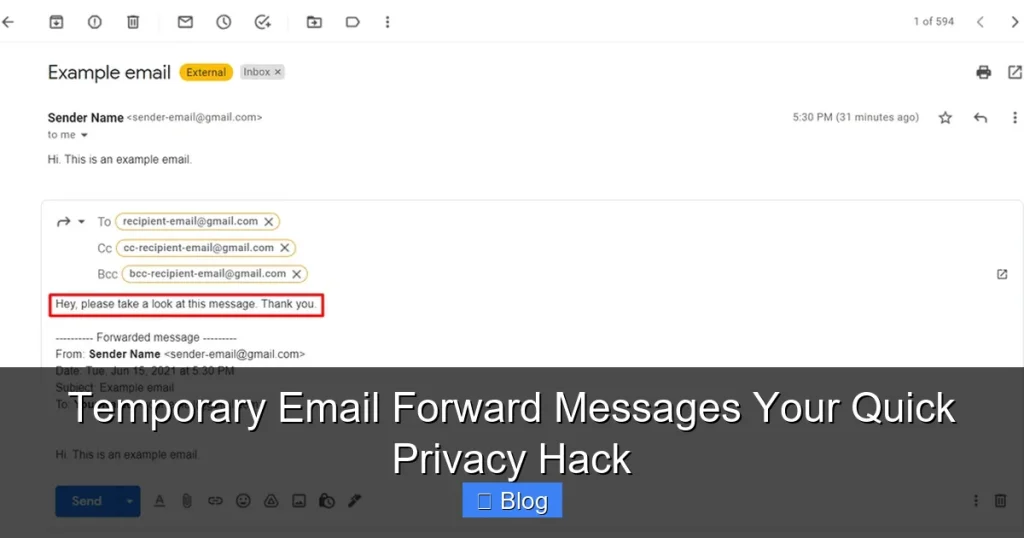
Temporary email forward messages are disposable email addresses that redirect incoming mail to your real inbox—but only for a short, predetermined time. Once that time expires (or you manually delete the address), the forwarding stops, and the temporary address becomes useless to anyone else. It’s like renting a mailbox for a single delivery: you get the package, then the mailbox vanishes.

Visual guide about Temporary Email Forward Messages Your Quick Privacy Hack
Image source: petri.com
Unlike permanent aliases or forwarding rules, these services are designed for ephemeral use. You don’t need to configure complex settings on your email provider. Instead, you use a dedicated service (often free) that generates a random, unique address—like “blue-cat789@temp-mail.org”—which forwards all mail to your actual Gmail, Outlook, or Yahoo account. The magic happens behind the scenes: the service acts as a middleman, shielding your real address while still delivering messages you care about.
How Do They Actually Work?
Here’s the simple breakdown:
- Step 1: You visit a temporary email service (e.g., TempMail, 10MinuteMail, or Guerrilla Mail).
- Step 2: The service instantly generates a random email address for you—no signup required.
- Step 3: You copy that address and paste it into any website’s signup form instead of your real email.
- Step 4: When someone sends an email to that temporary address, the service forwards it to your actual inbox.
- Step 5: After the set time (e.g., 10 minutes, 1 hour, 24 hours), the address expires. Any new emails sent to it bounce back or get deleted.
Some advanced services even let you customize the expiration time or manually extend it if you’re still using the address. The best part? You don’t need to check a separate inbox. Everything lands right where you already look—your main email.
Types of Temporary Email Services
Not all temporary email forward messages are created equal. Here’s what you’ll encounter:
- Browser-Based Generators: Sites like TempMail.org or 10MinuteMail.com create addresses instantly in your browser. No app install needed—just refresh for a new address. Great for one-off uses.
- Browser Extensions: Tools like “Temp Mail” for Chrome auto-fill signup forms with a fresh temporary address. Perfect if you sign up for lots of services.
- Dedicated Apps: Mobile apps (e.g., “Burner” or “Hushed”) offer more features, like SMS forwarding or custom domains, but often require a subscription.
- Email Provider Integrations: Some email services (like ProtonMail) include temporary aliases as a built-in feature for premium users.
For most people, browser-based services are the simplest starting point. They’re free, fast, and require zero commitment.
Why You Absolutely Need Temporary Email Forward Messages
Let’s cut to the chase: your email address is valuable. Spammers pay good money for lists of active emails. Data brokers scrape websites to build profiles of your online behavior. And hackers love targeting email accounts as a gateway to your bank, social media, or work systems. Temporary email forward messages solve these problems by making your real address invisible.
Visual guide about Temporary Email Forward Messages Your Quick Privacy Hack
Image source: the-sun.com
Here’s why this isn’t just a “nice-to-have” but a necessity in today’s digital world:
1. Slay Spam Forever
Remember that “free” ebook you downloaded last year? Or that discount code for a random online store? Chances are, you handed over your email—and now you’re stuck with weekly promotional emails. Temporary email forward messages break this cycle. Use a disposable address for one-time offers, and when it expires, so does the spam. No more unsubscribing from endless lists. No more clutter. Your main inbox stays pristine for messages that actually matter—like replies from friends or important work updates.
Real-Life Example: You sign up for a 7-day free trial of a meditation app. Instead of yourname@gmail.com, you use temp-zen@forwarder.com. After the trial ends, the address expires. The app can’t email you about “special offers” because the address is dead. Spam: eliminated.
2. Dodge Data Breaches Like a Pro
You’ve probably heard news about massive data breaches—like when a popular gaming site leaks millions of user emails. If you used your real email there, hackers now have it. They’ll try it on other sites (since people reuse passwords), potentially accessing your bank account or social media. But if you used a temporary email forward message? The breach only exposes the disposable address, which is already expired. Your real email stays safe, and your other accounts remain uncompromised.
Pro Tip: Pair temporary emails with a password manager. Use a unique, strong password for every site. If a breach happens, only that one account is at risk—not your entire digital life.
3. Keep Your Inbox for What Truly Matters
Your email should be a tool, not a chore. Temporary email forward messages filter out the noise so you only see high-priority messages. Imagine your inbox containing:
- Personal messages from family
- Work communications
- Critical alerts (e.g., bank notifications)
- …and nothing else
That’s the power of temporary email forward messages. By using them for low-stakes signups (like commenting on a blog or downloading a whitepaper), you reserve your real address for relationships and responsibilities that deserve your attention.
4. Avoid “Email Graveyards”
We’ve all done it: signed up for a service years ago, forgot about it, and now get occasional emails from a dormant account. These “email graveyards” are security risks—if the service gets hacked, your old email (and possibly old passwords) are exposed. Temporary email forward messages prevent this by ensuring you never create a permanent account with a sketchy site. Use it once, then forget it.
How to Set Up Temporary Email Forward Messages in 60 Seconds
You don’t need to be tech-savvy to use temporary email forward messages. Most services work in three clicks. Here’s your stress-free guide:
Visual guide about Temporary Email Forward Messages Your Quick Privacy Hack
Image source: familyorbit.com
Step 1: Pick Your Service
For beginners, we recommend:
- TempMail.org: Simple, no ads, addresses last up to 24 hours.
- 10MinuteMail.com: Exactly what it says—addresses expire in 10 minutes (great for ultra-short needs).
- Guerrilla Mail: Customizable expiration times and disposable inboxes.
Avoid services that require phone verification or seem sketchy—they might sell your data.
Step 2: Generate Your Temporary Address
Visit your chosen service. Instantly, you’ll see a random email address like “fluffy-panda@temp-mail.org.” Click “Copy” or highlight it and press Ctrl+C (Cmd+C on Mac).
Pro Tip: Some sites let you create a custom prefix (e.g., “my-trial@temp-mail.org”). Use this if you want to remember which address is for what!
Step 3: Paste It Everywhere (Safely!)
Go to the website where you’d normally enter your real email—say, a newsletter signup or free trial. Paste the temporary address into the email field. Complete the signup as usual.
Example: Downloading a free recipe ebook? Use temp-foodie@forwarder.com instead of yourname@gmail.com. When the site sends a confirmation email, it’ll land in your real inbox via the forwarder.
Step 4: Manage Replies (If Needed)
Most services let you reply directly from your main email. The temporary address acts as a mask—recipients see only the disposable address, not your real one. If you need to keep the conversation going beyond the expiration time, manually extend the address (if the service allows) or switch to your real email.
Step 5: Let It Expire (Or Delete It)
Once you’re done, walk away. The address will self-destruct after its set time. No cleanup required! If you’re using a browser extension, it might auto-delete addresses after 24 hours.
Warning: Never use temporary email forward messages for:
- Bank accounts or financial services
- Primary social media logins (e.g., Facebook, Instagram)
- Work-related communications
- Anything requiring long-term access
These need your real, verified email for security and recovery.
The Hidden Pitfalls: What to Watch Out For
Temporary email forward messages are incredibly useful, but they’re not magic. Here’s what could go wrong—and how to avoid it:
Pitfall 1: Services That Block Disposable Emails
Some reputable sites (like PayPal or government portals) block known temporary email domains to prevent fraud. If you get an error saying “Disposable emails not allowed,” you’ll need to use your real address—or find a service with less common domains (e.g., .xyz instead of .org).
Workaround: Try Guerrilla Mail, which rotates domains frequently to bypass blocks.
Pitfall 2: Missing Critical Emails
If a temporary address expires while you’re waiting for an important reply (e.g., a job offer), you’ll lose access. Always check the expiration time before using an address.
Pro Tip: For time-sensitive signups (like event RSVPs), use a 24-hour address and manually extend it if needed.
Pitfall 3: Privacy Risks from Shady Providers
Not all temporary email services are trustworthy. Some log your IP address, sell metadata, or inject ads into forwarded emails. Stick to well-reviewed providers with clear privacy policies.
Red Flags:
- Requests for excessive permissions (e.g., “access all your emails”)
- Pop-up ads demanding payment to “unlock” features
- No HTTPS encryption on the site
Pitfall 4: Over-Reliance for Security
Temporary email forward messages protect your address, but they don’t encrypt your emails or stop phishing attacks. If you click a malicious link in a forwarded message, you’re still at risk.
Safety First: Always verify sender legitimacy, even with temporary addresses. When in doubt, don’t click.
Pitfall 5: Forgetting to Use Them Consistently
The biggest mistake? Only using temporary emails for “sketchy” sites while giving your real address to semi-trusted services (like a local store’s loyalty program). Be ruthless: if you don’t plan to engage long-term, use a disposable address.
Mindset Shift: Treat your real email like your home address—only share it when absolutely necessary.
Pro Tips to Maximize Your Privacy Hack
Ready to level up? These advanced strategies turn temporary email forward messages from a basic tool into a privacy powerhouse:
Tip 1: Create a “Junk” Folder in Your Main Inbox
Set up a filter to auto-move emails from temporary addresses to a dedicated folder (e.g., “Temp Emails”). This keeps your primary inbox clean while ensuring you never miss a forwarded message.
How: In Gmail, click the search bar > “Create filter” > enter the temporary domain (e.g., “@temp-mail.org”) > “Create filter” > check “Skip Inbox” and “Apply label.”
Tip 2: Use Multiple Services for Different Needs
Rotate between TempMail, 10MinuteMail, and Guerrilla Mail. This makes it harder for trackers to link your activities across sites.
Tip 3: Pair with a Password Manager
When signing up with a temporary email, generate a unique password for that site. If the service gets hacked, only that account is compromised—not your entire digital identity.
Tip 4: Verify Expiration Times
Before using an address, confirm how long it lasts. Need it for 3 days? Choose a service with 72-hour addresses (some premium options offer this).
Tip 5: Bookmark Your Favorite Service
Save TempMail.org or your go-to provider in your browser bookmarks. One click = instant privacy.
Tip 6: Teach Friends and Family
Share this hack! Most people don’t realize how exposed they are. A quick “Try this for free trials” could save someone from spam hell.
Remember: temporary email forward messages aren’t about hiding from legitimate services—they’re about taking back control. You decide who gets your real address, and for how long.
Conclusion: Your Inbox, Your Rules
Let’s recap: temporary email forward messages are the ultimate privacy hack for anyone tired of spam, data breaches, and inbox chaos. They’re free, easy to use, and work in seconds. By swapping your real email for a disposable address on low-stakes signups, you shield your primary inbox from the digital equivalent of junk mail and security threats.
This isn’t just about convenience—it’s about reclaiming your digital autonomy. Every time you use a temporary email forward message, you’re voting for a cleaner, safer internet. You’re telling spammers, “Not today.” You’re telling data brokers, “My attention isn’t for sale.” And you’re telling yourself, “I control my online life.”
So next time you’re about to enter your email on a website you’ll probably never visit again, pause. Open TempMail.org. Copy that random address. Paste it. Feel that sigh of relief as you protect your real inbox. It takes less time than making a cup of coffee—and the payoff is a lifetime of peace of mind. Your email should serve you, not the other way around. Start using temporary email forward messages today, and take back your digital space.
Frequently Asked Questions
Can I reply to emails sent to a temporary address?
Yes! Most temporary email services forward replies back to your real inbox. When you respond, the recipient only sees the temporary address—not your personal email. Just ensure the address hasn’t expired before replying.
Are temporary email forward messages legal?
Absolutely. Using disposable addresses for privacy is perfectly legal and common practice. However, avoid using them for fraudulent activities (like fake signups to scam services), which violates terms of service and potentially laws.
What happens if I need to access an account after the temporary email expires?
You won’t be able to reset passwords or receive alerts since the address is dead. Only use temporary emails for one-time or short-term needs (e.g., free trials, downloads). For long-term accounts, use your real email or a permanent alias.
Do temporary email services store my data?
Reputable providers (like TempMail) delete forwarded emails after expiration and don’t log personal data. Always check a service’s privacy policy—avoid those that sell metadata or require excessive permissions.
Can websites detect and block temporary emails?
Yes, some sites block known disposable domains to prevent abuse. If you encounter this, try a service with less common domains (e.g., Guerrilla Mail) or use a custom domain alias if your email provider supports it.
Is it safe to use temporary emails for sensitive tasks?
Not for highly sensitive activities like banking or government portals—these require verified, permanent emails. Stick to low-risk uses: newsletters, free trials, or one-time downloads. For extra security, pair with a unique password.