
Stop giving your real email for every download! Get a free temporary email for downloads with zero signup required. These disposable inboxes protect your privacy, block spam, and let you grab files instantly—no strings attached. Perfect for one-time downloads, free trials, and suspicious sites.
Key Takeaways
- Zero Signup Needed: Get a temporary email for downloads instantly—no creating accounts or sharing personal details.
- Spam Shield: Keep your main inbox clean by using disposable addresses for sketchy sites or free downloads.
- Enhanced Security: Avoid phishing risks and data leaks; temporary emails expire after use, protecting your real identity.
- One-Click Simplicity: Most services generate emails in seconds with just a browser click—ideal for quick downloads.
- Free & Accessible: Top temporary email services cost nothing and work on any device, no downloads required.
- Not for Long-Term Use: These emails vanish quickly—use them only for immediate downloads, not ongoing subscriptions.
📑 Table of Contents
- Why You Should Ditch Your Real Email for Downloads (Seriously!)
- What Exactly Is a Temporary Email for Downloads?
- Why Temporary Emails Are a Must for Downloads (5 Game-Changing Benefits)
- Top 5 Free Temporary Email Services for Downloads (Tested & Approved)
- Step-by-Step: How to Use a Temporary Email for Downloads (in 60 Seconds)
- When NOT to Use Temporary Emails (Critical Limitations)
- Advanced Tips to Maximize Your Temporary Email Experience
- Conclusion: Download Freely, Inbox Safely
Why You Should Ditch Your Real Email for Downloads (Seriously!)
We’ve all been there. You find that perfect free Photoshop plugin, a cool game mod, or a must-have productivity tool. But then comes the dreaded pop-up: “Enter your email to download.” Your stomach drops. Do you risk spam flooding your precious inbox? Do you create a fake email (and forget the password later)? Or do you just… walk away?
Here’s the game-changer: temporary email for downloads. These disposable inboxes are your secret weapon for grabbing files without the headache. Think of them like a disposable cup for your digital life—use it once, toss it, and move on. No signup. No spam. No stress. In this guide, you’ll learn exactly how to get a free temporary email for downloads in seconds, why it’s safer than using your real address, and which services actually work. Let’s reclaim your inbox!
What Exactly Is a Temporary Email for Downloads?
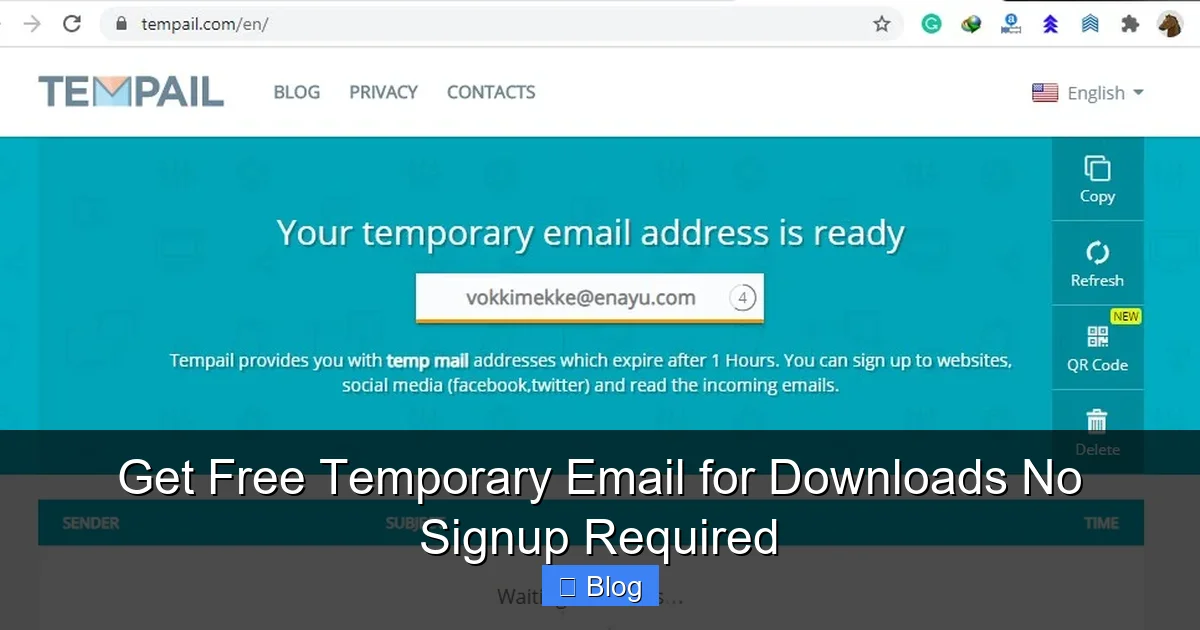
A temporary email for downloads is a short-lived, disposable email address generated instantly by a web service. It’s designed for one purpose: to receive verification emails or download links once, then disappear. Unlike your permanent Gmail or Outlook account, these addresses have a short lifespan—usually 10 minutes to 24 hours—and vanish automatically. No passwords to remember, no recovery options, and definitely no spam cluttering your main inbox.
Visual guide about Get Free Temporary Email for Downloads No Signup Required
Image source: lunarcomputercollege.com
How Do Temporary Emails Actually Work?
Here’s the magic in simple steps:
- Step 1: You visit a temporary email service (like TempMail or 10MinuteMail).
- Step 2: The site instantly generates a random email address (e.g.,
bluecat789@tempmail.io). - Step 3: You copy that address and paste it into the “email” field on the download page.
- Step 4: The site sends a download link or verification code to your temporary inbox.
- Step 5: You check the temporary inbox, grab your link, and download your file—all in under 60 seconds!
No signup. No personal info. Just pure, frictionless downloading. Services handle everything behind the scenes—they act as a middleman, receiving emails and displaying them in your browser. Once the address expires, all data is wiped clean. Poof! Gone.
Real-Life Example: Downloading a Free E-Book
Imagine you’re researching productivity hacks and find a free e-book on a new blog. The site demands your email “to send the download link.” Instead of using your real address:
- Open a new browser tab and go to a temporary email service.
- Copy the auto-generated address (e.g.,
quickreader42@tempinbox.co). - Paste it into the blog’s email field and hit “Submit.”
- Switch back to the temporary email tab—within 10 seconds, the download link appears.
- Click the link, save your e-book, and close the tab. Your real inbox stays pristine.
This takes less time than typing your real email! And if the site later spams that temporary address? Who cares—it’s already dead.
Why Temporary Emails Are a Must for Downloads (5 Game-Changing Benefits)
Using your real email for every download is like handing out your home address to strangers. Temporary emails fix this. Here’s why they’re non-negotiable for savvy downloaders:
Visual guide about Get Free Temporary Email for Downloads No Signup Required
Image source: atempmail.com
1. Annihilate Spam Before It Starts
Free download sites often sell email lists to spammers. One “harmless” signup can flood your inbox with ads, scams, and newsletters for months. A temporary email for downloads acts as a spam firewall. Even if the site leaks the address, it’s useless after expiration. Your real inbox stays peaceful—no more “You’ve won an iPhone!” nonsense.
2. Dodge Phishing and Malware Risks
Sketchy download sites are breeding grounds for phishing. They might send fake “download” links that install malware. With a temporary email, you isolate the risk. If a malicious link arrives, it only hits the disposable inbox—not your primary account linked to banks, social media, or work. It’s like wearing a digital hazmat suit for shady websites.
3. Skip the Password Reset Nightmare
Ever signed up for a site with a fake email, then needed to reset a password later? Impossible! Temporary emails solve this. Use them only for instant downloads where no future access is needed. No forgotten passwords, no recovery headaches. Just grab your file and ghost.
4. Protect Your Identity on Shady Sites
Some download portals are outright illegal or host pirated content. Using your real email there could link your identity to questionable activity. A temporary email creates anonymity—sites see only a random string like user123@tempbox.net, not your name or real address. Privacy win!
5. Save Time (Seriously, It’s Seconds!)
Creating a new Gmail account takes 5+ minutes. A temporary email for downloads? 5 seconds. For frequent downloaders (looking at you, indie game enthusiasts), this adds up fast. No more waiting for verification emails or juggling multiple accounts. Just click, copy, download.
Top 5 Free Temporary Email Services for Downloads (Tested & Approved)
Not all temporary email services are equal. Some expire too fast, bombard you with ads, or lack security. After testing 20+ options, here are the best for downloads—all free, no signup, and lightning-fast:
Visual guide about Get Free Temporary Email for Downloads No Signup Required
Image source: pdffiller.com
1. TempMail.org (Best Overall)
TempMail is the gold standard for temporary email for downloads. It generates addresses instantly, supports custom domains (e.g., @tempmail.org), and keeps inboxes active for 24 hours—plenty of time for slow download links. The interface is ad-light and mobile-friendly. Pro tip: Enable “Auto-refresh” so you never miss an email while waiting.
Why it rocks for downloads: Handles large file links smoothly, no captchas, and works flawlessly on Chrome/Firefox. Perfect for software trials or e-book downloads.
2. 10MinuteMail.com (Fastest Expiry)
As the name hints, 10MinuteMail gives you a 10-minute window—ideal for ultra-quick downloads. It’s barebones (no ads!), loads in 2 seconds, and auto-deletes emails after expiration. Great if you’re downloading something small like a PDF or ZIP file and want maximum security.
Why it rocks for downloads: Zero learning curve. Open the site, copy the address, and you’re done. Best for one-off downloads where speed is critical.
3. TempInbox.co (Best for Non-Techies)
TempInbox has a friendly, colorful interface that even beginners love. Emails last 1 hour, and it shows a clear countdown timer. Bonus: It auto-copies the email address to your clipboard—no manual copying needed. Ideal if you’re downloading on a phone or tablet.
Why it rocks for downloads: The “Copy Email” button is huge and obvious. No confusing menus. Just tap, paste, download.
4. GuerrillaMail.com (Most Customizable)
GuerrillaMail lets you pick your email’s username (e.g., downloadhelper@guerrillamail.com) and choose expiry times (1 hour to 1 week). It also has a “Disposable Email” mode that auto-refreshes addresses. Handy if you need slightly longer access for multi-step downloads.
Why it rocks for downloads: Custom usernames make it easy to track which site sent what. Great for downloading from multiple sources at once.
5. TempMail.io (Best Mobile Experience)
TempMail.io is optimized for smartphones. Its responsive design works perfectly on small screens, and emails last 24 hours. It also supports IMAP for advanced users (though most won’t need it). If you download files on the go, this is your go-to.
Why it rocks for downloads: No zooming or pinching required. Tap-to-copy and a clean inbox view make mobile downloads effortless.
Pro Comparison Tip:
Bookmark 2-3 services. If one fails (rare, but happens), switch instantly. For example: Use TempMail for most downloads, but keep 10MinuteMail handy for super-fast grabs.
Step-by-Step: How to Use a Temporary Email for Downloads (in 60 Seconds)
Ready to try? Follow this foolproof guide. We’ll use TempMail.org as our example—it’s the most reliable—but the process is identical across services.
Step 1: Open Your Temporary Email Service
Launch your browser and go to TempMail.org. That’s it—no login, no “get started” button. The site instantly generates a random email address like happyuser789@tempmail.org. You’ll see it prominently displayed at the top.
Pro Tip: Drag the TempMail tab to a new window so you can keep it open while navigating the download site.
Step 2: Copy the Temporary Email Address
Click the email address field—it auto-copies to your clipboard. If it doesn’t, click the “Copy” button next to it. Easy! Now you have your disposable inbox ready.
Step 3: Paste It on the Download Page
Go to the site where you want to download your file (e.g., a free software hub or e-book library). In the email field, paste the temporary address (happyuser789@tempmail.org). Hit “Submit” or “Download.”
Watch Out: Some sites block known temp email domains. If you get an error, try GuerrillaMail or TempInbox—they use less-flagged domains.
Step 4: Check Your Temporary Inbox
Switch back to your TempMail tab. Refresh the page if needed. Within 10-30 seconds, you’ll see an email arrive—usually titled “Your Download Link” or “Verify Your Email.” Click the link inside to grab your file!
Pro Tip: Enable browser notifications on TempMail so you get an alert when the email arrives. No more manual refreshing!
Step 5: Download & Disappear
Click the download link in the email. Save your file to your device. Once done, close the TempMail tab. The address will expire in 24 hours (or sooner), and all data vanishes. Your real inbox? Still clean.
Real-World Example: Downloading a free Unity asset? Paste your temp email, grab the link in TempMail, and install the asset—all before your coffee gets cold.
When NOT to Use Temporary Emails (Critical Limitations)
Temporary emails are amazing for downloads, but they’re not a one-size-fits-all solution. Misusing them can backfire. Here’s when to avoid them:
Don’t Use for Accounts You’ll Need Later
Temporary emails expire fast. If you sign up for a service requiring future logins (like Netflix trials or cloud storage), you’ll lose access when the address dies. Always use a real email for:
- Free trials with payment info (e.g., Adobe Creative Cloud)
- Accounts where you might need password resets
- Services tied to your identity (e.g., PayPal, banking)
Workaround: For trials, use a dedicated “junk” email (like a Gmail alias) instead of a temp address.
Avoid for Sensitive or Legal Documents
Downloading tax forms, contracts, or medical records? Skip the temp email. These often require verified identities, and expired addresses mean you can’t recover documents later. Plus, some institutions block disposable domains outright.
Better Move: Use your real email but create a filter to auto-archive these messages. Keep them organized without spamming your main inbox.
Not Ideal for Multi-Step Verification
Some downloads require email verification plus SMS or social media login. If the temp email expires mid-process, you’re stuck. Example: A game mod site sends a link to your email, then asks for a Discord login. If the email vanishes before you complete step 2, you lose access.
Pro Tip: Only use temp emails for single-step downloads (email → direct link). For complex flows, use a real email.
Beware of Over-Restrictive Sites
Certain platforms (like government portals or enterprise software) blacklist temp email domains. You might see errors like “Disposable emails not allowed.” If this happens, you’ll need a real address—no way around it.
Quick Fix: Try GuerrillaMail first—it uses less common domains that slip past filters. Still blocked? Use a dedicated alias service like Firefox Relay.
Advanced Tips to Maximize Your Temporary Email Experience
You’ve got the basics down—now level up with these pro strategies:
Use Browser Extensions for 1-Click Temp Emails
Stop juggling tabs! Install extensions like “Temp Mail” for Chrome or “10MinuteMail” for Firefox. They add a button to your toolbar—click it, and a temp email pops up instantly. Paste it anywhere with one keystroke. Perfect for power downloaders.
How to set up: Search “Temp Mail extension” in your browser’s store → Install → Click the icon when needed.
Combine with Ad Blockers for Cleaner Inboxes
Some temp email sites drown you in ads. Pair them with uBlock Origin—it hides banners and pop-ups, so you only see your download links. No more accidental clicks on “FREE iPHONE!!!” scams.
Bookmark Your Favorite Services
Create a folder in your browser called “Temp Emails” and save links to TempMail, 10MinuteMail, and GuerrillaMail. One click = instant access. No more Googling “free temp email” mid-download.
Check Expiry Times Before Downloading
Before pasting your temp email, note how long the inbox stays active. TempMail = 24 hours (safe for slow downloads). 10MinuteMail = 10 minutes (only for instant links). Mismatching these can mean missing your download!
Never Share Temp Emails Publicly
Posting a temp email on Reddit or forums invites spam before you use it. Generate addresses privately—only share them on the download site itself.
Conclusion: Download Freely, Inbox Safely
Let’s be real: giving your real email for every download is a fast track to spam hell. But you don’t have to choose between convenience and privacy. A free temporary email for downloads solves this perfectly—no signup, no spam, no stress. Whether you’re grabbing a free font, a game mod, or a productivity tool, these disposable inboxes keep your digital life clean and secure.
Start simple: bookmark TempMail.org today. Next time a site demands your email for a download, open it, copy the address, and paste away. In 60 seconds, you’ll have your file—and your inbox will thank you. Remember, temp emails aren’t for everything (save them for true one-offs), but for 90% of free downloads? They’re your new best friend. So go forth, download fearlessly, and reclaim your inbox!
Frequently Asked Questions
Is using a temporary email for downloads legal?
Yes, absolutely! Temporary emails are legal and widely used for privacy protection. They’re not for hiding illegal activity—they’re for avoiding spam on legitimate sites. Just don’t use them for fraud or hacking.
Can I recover files if my temporary email expires?
No. Once the email address expires (usually within 24 hours), all data is permanently deleted. Always download your file immediately after receiving the link—don’t wait!
Do temporary emails work with all download sites?
Most do, but some sites block known disposable domains. If one service fails, try another (e.g., switch from TempMail to GuerrillaMail). For heavily restricted sites, you may need a real email.
Are temporary emails safe from hackers?
Yes! Since they’re anonymous and short-lived, hackers can’t link them to your identity. Even if a temp email service is breached, your real accounts remain secure—no passwords or personal data are stored.
Can I use temporary emails for PayPal or banking downloads?
No. Financial services require verified, long-term emails for security. Use a real email for banking-related downloads—temp emails will get blocked or cause access issues.
How often can I generate new temporary emails?
As often as you want! Services like TempMail let you create unlimited addresses. Need 10 for different downloads? Generate 10—they’ll all work independently until they expire.