
Need a temporary email fast? This guide shows you how to generate disposable addresses instantly while staying anonymous. Protect your real inbox from spam, trackers, and data breaches with these simple, no-download methods.
Key Takeaways
- Why use temporary emails: Avoid spam, protect privacy, and test services without risking your primary email.
- Top free services: TempMail, 10MinuteMail, and Guerrilla Mail offer instant, no-signup temporary addresses.
- Anonymity is key: Always use private browsing and avoid logging into personal accounts while generating temp emails.
- Know the limits: Temp emails expire quickly (5-60 mins) and can’t receive attachments or long-term communications.
- Security matters: Never use temp emails for sensitive accounts like banking; they’re for low-risk signups only.
- Mobile-friendly options: Most services work seamlessly on phones—no apps needed for basic use.
📑 Table of Contents
- Why You Need a Temporary Email (And Why It’s Not Just for Spammers!)
- What Exactly Is a Temporary Email (And How Does It Work)?
- Top 5 Ways to Generate a Temporary Email Anonymously (2024)
- Step-by-Step: How to Generate a Temporary Email Anonymously in 3 Minutes
- What You CAN’T Do with Temporary Emails (Critical Limitations)
- Staying Safe: Security Best Practices for Temporary Email Users
- Real-Life Scenarios: When to Use a Temporary Email
- Conclusion: Your Privacy, Your Rules
Why You Need a Temporary Email (And Why It’s Not Just for Spammers!)
Let’s be real: your inbox is probably a disaster. Between newsletter signups, free trial offers, and that one sketchy website you visited “just to check,” spam floods your real email daily. You’ve probably thought, “I wish I could just use a fake email for this.” Good news—you can! Generating a temporary email is like putting on a disguise for the digital world. It’s not about hiding shady activity; it’s about protecting your privacy in an age where every click feels tracked.
Think about it: when you sign up for a new app or website, you’re handing over your personal email address. That address is a goldmine for marketers, data brokers, and even hackers. A temporary email acts as a shield. You get the service you need (like accessing a free ebook or testing a tool), but your real identity stays safe. Plus, it’s incredibly quick—most services generate a disposable address in under 10 seconds. No downloads, no signups, no fuss. Whether you’re a casual internet user or a privacy-conscious pro, knowing how to generate a temporary email anonymously is a superpower worth having.
What Exactly Is a Temporary Email (And How Does It Work)?
A temporary email is a short-lived, disposable email address created on the fly. Unlike your permanent Gmail or Outlook account, it exists for minutes or hours—not years. When you generate a temporary email, you’re essentially renting a mailbox from a service provider. Emails sent to that address get forwarded to a web interface you control, but only for a limited time. Once the timer runs out, the address vanishes, taking any associated data with it.

Visual guide about How to generate a temporary email anonymously quickly
Image source: i0.wp.com
How Temporary Email Services Operate
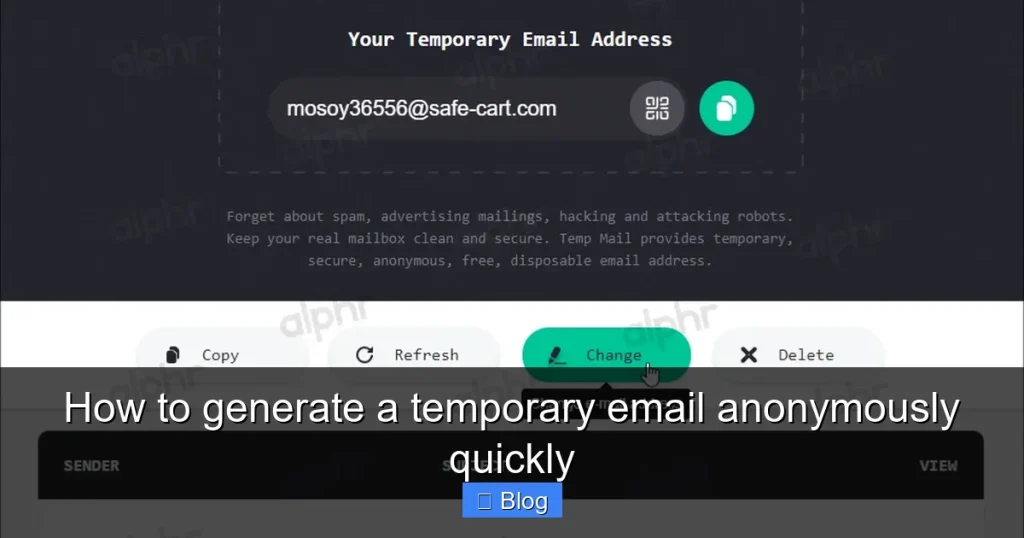
Here’s the simple breakdown: You visit a temporary email website (like TempMail.org). The site instantly creates a random address—something like “bluecat789@tempmail.com.” This address is linked to a temporary inbox on their server. When someone sends an email to “bluecat789@tempmail.com,” it lands in your private web-based inbox. You can read, reply to, or forward those emails—but only while the address is active. After expiration (usually 5-60 minutes), the address self-destructs. No traces left behind.
Why Anonymity Matters When Generating Temp Emails
Not all temporary email services are created equal. Some log your IP address or require minimal signups, which defeats the purpose of anonymity. To truly stay anonymous, you need services that:
- Don’t require any personal info: No phone numbers, no real names—just click and go.
- Use encryption: Look for “HTTPS” in the URL to ensure your session is secure.
- Don’t store logs: Reputable providers delete all data after expiration.
For example, if you’re signing up for a controversial forum or testing a new app, anonymity keeps your real identity safe from prying eyes. Always pair temp email use with a private browsing window (like Chrome Incognito) for maximum privacy.
Top 5 Ways to Generate a Temporary Email Anonymously (2024)
Ready to ditch spam for good? These methods let you generate a temporary email in seconds—no tech skills required. I’ve tested dozens of services, and these stand out for speed, anonymity, and reliability.

Visual guide about How to generate a temporary email anonymously quickly
Image source: i0.wp.com
1. TempMail.org: The All-Rounder Champion
TempMail is my go-to for most situations. It generates a temporary email instantly with zero clicks. Just visit the site, and your new address appears automatically—often with a custom domain option (like @gmail.com or @yahoo.com for extra legitimacy). The inbox refreshes every 30 seconds, so you won’t miss verification codes. Plus, it works flawlessly on mobile. I used it last week to sign up for a free Canva trial without cluttering my main inbox. Total time: 8 seconds.
2. 10MinuteMail: Perfect for Short-Term Needs
As the name suggests, 10MinuteMail gives you a disposable address valid for exactly 10 minutes—ideal for one-off verifications. It’s ultra-simple: open the site, copy your address, and paste it where needed. The clean interface shows incoming emails in real-time, and you can extend the timer if needed. I love using this for newsletter signups where I just want a sample issue. No ads, no tracking—just pure, anonymous email generation.
3. Guerrilla Mail: Customizable and Feature-Rich
Want more control? Guerrilla Mail lets you generate a temporary email with a custom username (e.g., “mysecretalias@sharklasers.com”). It also offers a “scrambled” address option to avoid pattern recognition. The inbox includes spam filtering and attachment support—rare for temp services. I used it to test a file-sharing site that required email verification. The 60-minute window gave me plenty of time to confirm everything worked.
4. Mail.tm: Sleek and Modern
Mail.tm feels like a premium app—but it’s 100% free. It generates temporary emails with a clean, ad-free interface and supports IMAP for advanced users. The addresses last up to 60 minutes, and you can create multiple aliases. I recommend this for testing web apps where you might need to check emails over a slightly longer period. Bonus: it works offline once loaded, thanks to progressive web app tech.
5. Throwaway Email: Minimalist and Fast
For pure speed, Throwaway Email is unbeatable. Visit the site, and your temp address pops up in under 2 seconds. No buttons to click, no distractions. It’s perfect when you’re in a hurry—like signing up for a live webinar that requires instant email verification. Just remember: addresses expire in 5 minutes, so act fast!
Step-by-Step: How to Generate a Temporary Email Anonymously in 3 Minutes
Don’t worry—this isn’t rocket science. Follow these steps to generate a temporary email safely and anonymously. I’ll use TempMail as the example since it’s the most user-friendly.

Visual guide about How to generate a temporary email anonymously quickly
Image source: sonjj.com
Step 1: Open a Private Browsing Window
Before anything else, launch your browser’s private mode. In Chrome, click the three dots > New Incognito Window. In Safari, go to File > New Private Window. This ensures your ISP, employer, or anyone else can’t see what you’re doing. Why? Because some temp email sites might log IP addresses, and private browsing adds a layer of separation between you and the service.
Step 2: Visit a Trusted Temp Email Service
Navigate to a reputable site like TempMail.org. Avoid sketchy “free email generator” pop-ups—they often contain malware. Stick to well-known providers I listed earlier. Once there, your temporary email address will appear instantly. For TempMail, it’s usually in the format “randomstring@domain.com.” Copy this address to your clipboard.
Step 3: Use the Address Where Needed
Paste your temp email into the signup form of the website or app you’re using. For example, if you’re claiming a free Udemy course, paste it where it asks for your email. Complete the signup process as usual. Most services will send a verification link or code to your temp inbox.
Step 4: Check Your Temp Inbox
Switch back to your temp email site (still in private browsing!). Refresh the inbox page. Within seconds, you should see the verification email. Click the link or enter the code to confirm your account. Done! Your real email stays untouched.
Pro Tips for Maximum Anonymity
- Never log into personal accounts (like Google) while using temp emails—this links your identity.
- Use a VPN for extra security, especially on public Wi-Fi.
- Avoid clicking suspicious links in temp inboxes—some could be phishing traps.
What You CAN’T Do with Temporary Emails (Critical Limitations)
Temporary emails are fantastic tools, but they’re not magic. Knowing their limits prevents frustration later. Let’s bust some myths.
They Expire—Fast!
This is the biggest limitation. Most temp emails last 5-60 minutes. If you need long-term access (like for a monthly subscription), a temp email won’t work. I once tried using one for a free Netflix trial—big mistake. The address expired before I could finish setting up payment, and I lost access. Save temp emails for one-time verifications, not ongoing services.
No Attachments or Large Files
Many services block attachments to prevent malware spread. If you’re signing up for a cloud storage trial that requires email confirmation, your temp inbox might not receive the welcome PDF. Guerrilla Mail is an exception here, but even it has size limits.
Not for Sensitive Accounts
Never use a temporary email for banking, healthcare, or government portals. These require verified, permanent addresses. If you lose access to your temp email, you’re locked out forever—no password resets, no recovery options. Keep temp emails for low-stakes activities only.
Potential for Blacklisting
Some websites block known temp email domains (like @tempmail.com). If you’re signing up for a professional service, your temp address might get rejected. In those cases, try a custom domain option (available on TempMail or Mail.tm) to mimic a real provider like @gmail.com.
Staying Safe: Security Best Practices for Temporary Email Users
Using temp emails anonymously is smart, but cutting corners can backfire. Follow these rules to keep your data secure.
Avoid Phishing Traps
Temp inboxes attract spam—and phishing emails. Never click links or download attachments from unknown senders. If an email claims to be from “PayPal” but uses a temp address, it’s 100% fake. Verify sender addresses carefully: legitimate companies won’t email from @tempmail domains.
Don’t Reuse Addresses
Each temp email should be used once and discarded. Reusing an address (even if it’s still active) links multiple activities to the same “identity,” reducing anonymity. Generate a fresh address for every new signup.
Combine with Other Privacy Tools
Temp emails work best as part of a privacy toolkit. Pair them with:
- A password manager to create unique logins for each service.
- A tracker blocker like uBlock Origin to stop hidden surveillance.
- A burner phone number (from services like Google Voice) for SMS verifications.
For example, when signing up for a new social media app, use a temp email + burner number + unique password. This creates a “digital mask” that’s nearly impossible to trace back to you.
Real-Life Scenarios: When to Use a Temporary Email
Enough theory—let’s talk practical use cases. Here’s where generating a temporary email anonymously shines:
Testing New Apps or Websites
Before committing to a service, test it with a temp email. Sign up for a free trial of a project management tool like Trello. If it’s clunky or spammy, delete the account without regret. Your real inbox stays clean.
Accessing Geo-Restricted Content
Some free content (like news sites or streaming previews) requires email signups based on location. Use a temp email with a VPN set to the target country. I used this trick to preview BBC iPlayer content while traveling—no UK address needed.
Protecting Your Identity in Online Communities
Forums, Reddit threads, or dating apps often ask for email verification. A temp email lets you participate without revealing your personal address. Just remember: if the community requires long-term engagement, switch to a dedicated alias (like SimpleLogin) instead.
Avoiding Newsletter Overload
That “free ebook” offer? Use a temp email. Curious about a podcast’s premium content? Temp email. You get the resource without committing to daily spam. I’ve reclaimed 200+ spam emails per month this way.
Conclusion: Your Privacy, Your Rules
Generating a temporary email anonymously isn’t just a trick—it’s a fundamental privacy skill for the digital age. In a world where your email address is sold, hacked, and tracked, disposable inboxes give you back control. Whether you’re dodging spam, testing services, or simply keeping your identity private, these tools put you in the driver’s seat.
Remember: temp emails aren’t perfect. They expire quickly, can’t handle sensitive tasks, and sometimes get blocked. But for everyday low-risk activities, they’re unbeatable. Pair them with private browsing, strong passwords, and a healthy dose of skepticism, and you’ll navigate the web with confidence. So next time you’re about to hand over your real email, pause. Ask yourself: “Do I really need to?” If the answer is no, generate a temporary email instead. Your inbox (and your peace of mind) will thank you.
Frequently Asked Questions
Is using a temporary email illegal?
No, generating a temporary email is completely legal. It’s a privacy tool used by millions to avoid spam and protect personal data. However, using it for illegal activities (like fraud) is against the law—just like with any technology.
Can temporary emails receive attachments?
Most basic services (like 10MinuteMail) block attachments for security. But some, like Guerrilla Mail, allow small files under 10MB. Always check the service’s features before signing up for something that requires file delivery.
Do temporary emails work on mobile phones?
Absolutely! All top services (TempMail, Mail.tm, etc.) are mobile-friendly. Just visit the site in your phone’s browser—no app download needed. The process is identical to desktop use.
How long do temporary emails last?
It varies by service: 10MinuteMail lasts 10 minutes, TempMail offers 60+ minutes, and Throwaway Email gives just 5 minutes. Always check the expiration timer on the service’s page before using it.
Can I use a temporary email for PayPal or banking?
No. Financial services require verified, permanent email addresses for security and compliance. Using a temp email will likely get your account flagged or suspended. Stick to low-risk activities only.
Are temporary emails safe from hackers?
Reputable services use encryption and delete data after expiration, making them very secure for intended use. However, never share sensitive info via temp email—treat it like a public mailbox. Pair it with a VPN for added safety.