Temporary emails offer quick privacy but come with hidden dangers. They’re great for spam but terrible for anything important like banking or personal accounts. Understanding their security flaws helps you avoid identity theft and data leaks.
Key Takeaways
- Ephemeral ≠ Secure: Disappearing emails don’t protect your data from hackers or the service provider itself.
- Zero Encryption Standard: Most temporary email services lack end-to-end encryption, making messages readable by anyone intercepting traffic.
- Phishing & Scam Magnet: These inboxes are prime targets for malicious links and fake login pages designed to steal credentials.
- Account Recovery Nightmare: Losing access to a temporary email means permanently losing linked accounts with no recovery option.
- Data Harvesting Risk: Providers often sell anonymized user data or log IP addresses, defeating the purpose of anonymity.
- Use Only for Low-Risk Tasks: Reserve temporary emails for one-time signups like newsletters or free trials – never for banking, healthcare, or sensitive info.
- Choose Wisely: Opt for reputable providers with clear privacy policies and HTTPS encryption, but assume all are inherently risky.
📑 Table of Contents
- How Secure Is Temporary Email? What You Must Know
- How Temporary Email Services Actually Work (And Why Security Is an Afterthought)
- The Ugly Truth: Major Security Risks of Temporary Emails
- When Should You (And Shouldn’t) Use a Temporary Email?
- How to Use Temporary Emails More Securely (If You Must)
- The Verdict: Convenience vs. Security – A Clear Choice
How Secure Is Temporary Email? What You Must Know
Picture this: You need to download a free ebook, sign up for a webinar, or grab a discount code. The site demands your email. You hesitate. You don’t want spam flooding your main inbox. So you fire up a temporary email service, generate a random address like “bluecat73@tempmail.io,” and proceed. Problem solved? Not quite. While temporary emails feel like a privacy superhero, their security is often shockingly flimsy. Understanding how secure temporary email really is isn’t just tech trivia – it’s essential for protecting your identity, finances, and digital life. Let’s pull back the curtain on these convenient tools and uncover the risks you absolutely must know.
Temporary email services promise anonymity and spam protection by providing disposable email addresses that vanish after a short time – usually minutes, hours, or days. They seem like the perfect solution for avoiding unwanted emails. But convenience often comes at a hidden cost. The core question isn’t just “do they work?” but “how secure is temporary email when your data or identity is on the line?” The uncomfortable truth is that for most sensitive activities, temporary emails are a security liability, not a shield. They create a false sense of safety while potentially exposing you to greater risks than using your real email with proper spam filters. Let’s dive deep into why.
How Temporary Email Services Actually Work (And Why Security Is an Afterthought)
Visual guide about How Secure Is Temporary Email What You Must Know
Image source: chykalophia.com
Before assessing security, it’s crucial to understand the basic mechanics. Temporary email services operate as intermediaries. When you generate an address (e.g., “random123@mailtemp.org”), the service creates a virtual inbox on their server. Emails sent to that address are held there temporarily. You access them through the service’s website or app, usually without needing to register an account yourself. After a set period (or when you close the tab), the inbox and all its contents are typically deleted.
The Convenience Trap: Speed Over Safety
The entire business model of most free temporary email providers hinges on speed and simplicity. They prioritize getting you an address in seconds, not implementing robust security. Think about it: if they spent significant resources on encryption, rigorous audits, and secure infrastructure, the service would likely become slower, more complex, or require payment – defeating the core appeal of “free and instant.” This fundamental focus on convenience directly undermines security. Features like end-to-end encryption (where only you and the sender can read the email) are rare because they add complexity and cost. Similarly, strong user authentication (like 2FA) for accessing the temporary inbox is almost non-existent, as it creates friction for the one-time user.
Who Runs These Services? The Trust Factor
Most temporary email providers are small operations, often run by individuals or tiny teams. They rarely have the resources, expertise, or incentive to invest in enterprise-grade security. Their privacy policies are frequently vague or non-existent. Can you trust “MailTemp42.com” with your data? Probably not. Unlike established email providers (Gmail, Outlook) that have massive security teams and legal obligations, temporary email services operate in a gray area with minimal accountability. They might log your IP address, the websites you use the temp email for, or even the content of your emails – data that could be sold, leaked, or seized by authorities. The lack of transparency makes it impossible to verify their security claims.
The Ugly Truth: Major Security Risks of Temporary Emails
Visual guide about How Secure Is Temporary Email What You Must Know
Image source: cdn.maileroo.com
Now, let’s confront the harsh realities. How secure is temporary email? For critical tasks, the answer is often “not at all.” Here are the most significant threats:
1. Zero End-to-End Encryption: Your Emails Are Wide Open
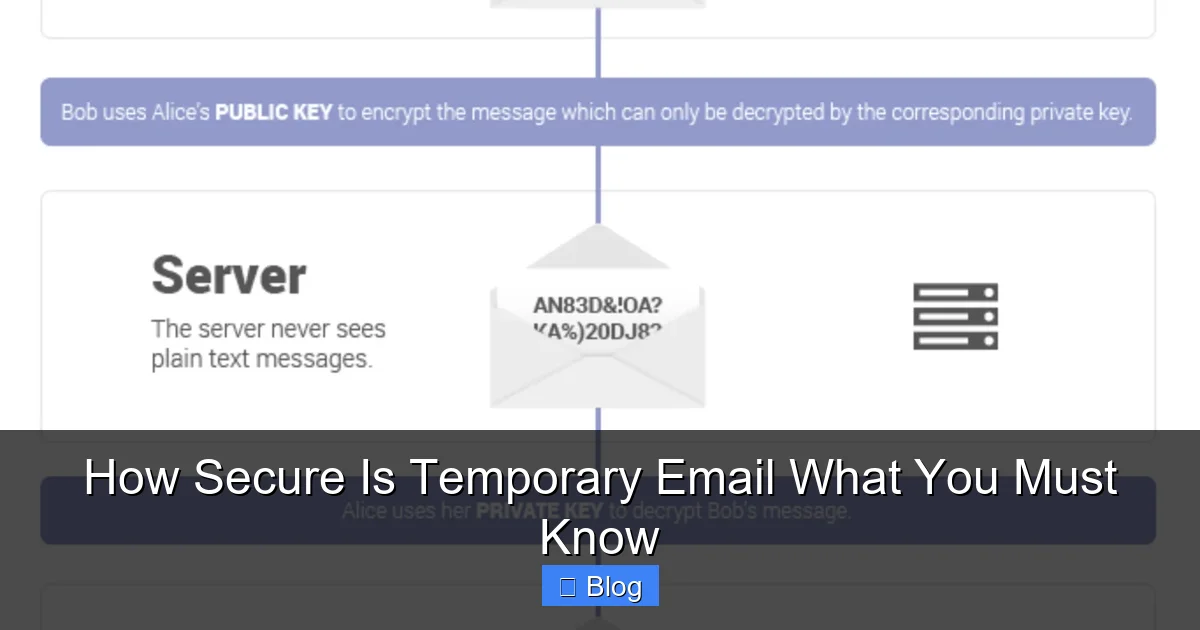
This is the biggest flaw. Standard email (SMTP) is inherently insecure, like sending a postcard. Anyone who intercepts the traffic between servers can read it. Reputable email providers add layers of security (like TLS encryption in transit), but temporary email services often skip even these basics. Many operate solely over unencrypted HTTP, not HTTPS. This means:
* **Man-in-the-Middle (MitM) Attacks:** Hackers on the same public Wi-Fi network can easily capture emails sent to or from your temporary inbox. Imagine logging into a fake “Netflix trial” page using a temp email on airport Wi-Fi – a hacker could snag your Netflix password *and* the email confirmation.
* **Provider Access:** The temporary email service itself can read every single email that lands in your disposable inbox. There’s no technical barrier preventing them from scanning content for advertising, selling data, or even altering messages. They hold all the keys.
* **Example:** You use a temp email to sign up for a cryptocurrency exchange. The exchange sends a verification link. If that link is intercepted due to lack of encryption, a hacker could click it and take over the account before you do.
2. Phishing and Malware Haven: Attackers Love Temp Inboxes
Temporary email addresses are like neon signs for cybercriminals saying “Low-Hanging Fruit Here!” Why?
* **Anonymity for Attackers:** Scammers use temp emails to send phishing links or malware because tracing them back is difficult. They create fake login pages (e.g., “Your PayPal account is locked!”) and send the link to random temp email addresses. Since the victim expects “junk,” they might click without suspicion.
* **Trust Exploitation:** You *expect* the temp inbox to contain spam or verification emails. This makes you more likely to click a malicious link disguised as a “confirm your account” message from a service you *just* signed up for using the temp email.
* **Real-World Impact:** Clicking a phishing link in your temp inbox can lead to stolen credentials for *other* accounts (if you reuse passwords), malware installation on your device, or even financial theft if the scam targets payment info. The temp email becomes the entry point for a much larger attack.
3. Data Harvesting and Privacy Violations
Don’t assume your activity is anonymous. Many temporary email providers:
* **Log IP Addresses:** They record the IP address you use to access the service, potentially linking your real location and identity to the temp email activity.
* **Track Usage:** They might log which websites you use the temp email for, building a profile of your browsing habits.
* **Sell Data:** Anonymized (or not-so-anonymized) data about user behavior, email content (minus personally identifiable info, but often still revealing), or even the temp email addresses themselves can be sold to data brokers or advertisers.
* **Example:** You use a temp email to sign up for a health forum. The provider logs your IP and the forum name. While they might not know *your name*, they know your approximate location and that you’re interested in health topics – valuable data for targeted advertising or profiling.
4. The Account Recovery Black Hole
This is a critical, often overlooked risk. Temporary emails are designed to disappear. If you use one to sign up for an important service (like a cloud storage account, a forum you contribute to, or even a shopping site), you create a permanent problem:
* **Password Resets Fail:** If you forget your password for that service later, the “Forgot Password” link gets sent to the *temporary* email address – which no longer exists. You are permanently locked out.
* **No Recovery Path:** There is absolutely no way to recover access to the temporary inbox or prove you owned it. The service provider (e.g., the forum) has no recourse. Your account is gone forever.
* **Real Consequence:** Imagine using a temp email for a niche hobby forum where you’ve built reputation over months. Lose access to the temp email? You lose your entire account and history. Using it for a bank account? Catastrophic.
When Should You (And Shouldn’t) Use a Temporary Email?
Visual guide about How Secure Is Temporary Email What You Must Know
Image source: images.ctfassets.net
Knowing the risks, the key is context. Temporary emails aren’t inherently evil, but they’re dangerously misapplied. Here’s a clear guide:
✅ Safe(ish) Uses: Low-Risk, One-Time Interactions
Reserve temporary emails for situations where:
* **The value of the account is near zero:** Downloading a free whitepaper, signing up for a one-time webinar, accessing a limited-time discount code, or verifying a social media account you’ll never use again.
* **No personal/financial data is involved:** Avoid providing real names, addresses, phone numbers, or payment details when using a temp email. If the service asks for these, *do not use a temp email*.
* **You expect immediate, disposable communication:** Like receiving a single verification code for a service you’ll abandon after use.
* **Example:** You find a cool free font website requiring an email. Use a temp email. You get the download link, grab the font, and forget the address. No harm done.
❌ Dangerous Uses: High-Risk Activities to Avoid
**Never** use a temporary email for:
* **Financial Services:** Banking, investment platforms, payment processors (PayPal, Stripe), cryptocurrency exchanges. Password resets and critical security alerts *must* go to a permanent, secure email.
* **Healthcare & Sensitive Data:** Patient portals, therapy apps, services handling medical records. HIPAA compliance requires secure communication channels temp emails lack.
* **Important Accounts:** Email accounts (Gmail, Outlook), cloud storage (Google Drive, Dropbox), social media profiles you actively use, work-related systems. Losing access is devastating.
* **Services Requiring Long-Term Access:** Forums, communities, newsletters you want to keep receiving, subscription services (even free tiers you might use later).
* **Anything Involving Real Identity Verification:** Services requiring ID scans, address verification, or phone number linking. Temp emails undermine the verification process.
* **Example:** Signing up for a new bank account using a temp email. When you need to reset your password months later due to a security alert, the reset link goes to a dead address. Your money is inaccessible.
How to Use Temporary Emails More Securely (If You Must)
If you decide a temporary email is the only option for a low-risk task, follow these steps to minimize danger:
1. Choose Reputable Providers (Carefully)
Not all temp email services are equally sketchy. Look for:
* **HTTPS Encryption:** The URL must start with `https://` (padlock icon). This encrypts traffic *between your browser and their server*, mitigating MitM attacks on public Wi-Fi. Avoid any site using plain `http://`.
* **Clear Privacy Policy:** Read it! Does it state they don’t log IPs? Do they sell data? Vague policies are a red flag. Some slightly more reputable options (though still risky) include TempMail.org (owned by a larger company), Guerrilla Mail, or 10MinuteMail. **Remember:** “Reputable” in this niche is relative – assume all have risks.
* **Avoid Browser Extensions:** Many temp email browser extensions request excessive permissions (like reading all your web traffic) and are prime malware vectors. Use the service’s website directly.
2. Never Enter Real Personal Information
Treat the temporary email address as completely anonymous. Do *not* provide:
* Your real name
* Home address
* Phone number
* Date of birth
* Any financial details
If a service requires this info, it’s a sign you shouldn’t be using a temp email there anyway. Walk away.
3. Be Hyper-Vigilant for Phishing
Assume *every* email in your temporary inbox is potentially malicious:
* **Scrutinize Links:** Hover over links (without clicking) to see the real URL. Does it match the supposed sender? Is it `http://` (insecure) or a misspelled domain (e.g., `paypa1-security.com`)?
* **Never Download Attachments:** Especially .exe, .scr, .zip, or .docm files. They are almost always malware.
* **Verify Sender Addresses:** Check if the “From” address looks legitimate. Scammers often spoof addresses.
* **When in Doubt, Delete:** If an email seems even slightly suspicious, don’t click anything. Close the tab and generate a new temp address if needed.
4. Use It Immediately and Forget It
The shorter the lifespan, the lower the risk (to a point). Use the temp email *only* for the immediate task:
* Get the verification code or download link.
* **Do not** use it to sign up for anything you might need later.
* Close the browser tab immediately after you’re done. Don’t leave the inbox open.
* Consider using services with very short lifespans (5-10 minutes) for single-code verifications.
5. Combine with Other Security Practices
* **Unique Passwords:** Always use a strong, unique password for *any* account, even those signed up with a temp email. A password manager is essential.
* **2FA on Permanent Accounts:** Enable Two-Factor Authentication (2FA) on your *real*, permanent email account and critical services. This adds a vital layer of security beyond the email itself.
* **Good Antivirus:** Keep your device protected in case you accidentally click something nasty.
The Verdict: Convenience vs. Security – A Clear Choice
So, how secure is temporary email? The honest answer is: **not very, especially for anything beyond the most trivial, disposable interactions.** They solve the spam problem but introduce significant, often overlooked security vulnerabilities. The lack of encryption, the high risk of phishing, the potential for data harvesting, and the absolute impossibility of account recovery make them fundamentally unsuitable for sensitive tasks.
Temporary emails are a tool, and like any tool, their safety depends entirely on *how* you use it. Used wisely for low-stakes, one-off signups where losing access means nothing, they can be a handy spam filter. But misused for banking, healthcare, or important accounts, they become a fast track to identity theft, financial loss, and permanent data loss.
The convenience they offer is real, but it’s a false economy if it compromises your core digital security. In today’s threat landscape, where a single compromised email can unravel your entire online life, the risks of temporary emails for anything important far outweigh the minor benefit of keeping your main inbox clean. Prioritize security over convenience for your critical accounts. Use your real, well-protected email with strong spam filters for anything that matters. Reserve the temporary email for the digital equivalent of grabbing a free pen at a conference – something you’ll happily toss in the trash the moment you leave.
Protecting your digital identity requires vigilance. Understanding the limitations of tools like temporary emails is a crucial part of that defense. Don’t let the illusion of anonymity lull you into a false sense of security. Be smart, be selective, and keep your most valuable accounts tethered to a secure, permanent email address you control.
Frequently Asked Questions
Can I recover a temporary email address if I lose access?
No, absolutely not. Temporary email addresses are designed to be ephemeral. Once the inbox expires (after minutes, hours, or days) or you close the session, it’s permanently deleted with no recovery option. Any accounts linked to it become inaccessible.
Are temporary email services illegal to use?
Using temporary emails itself is generally legal. However, using them for illegal activities (like fraud, spamming, or evading bans) is illegal. Legitimate services often prohibit abusive use in their terms.
Do temporary email providers read my emails?
Yes, technically they can. Most lack end-to-end encryption, meaning the provider has full access to the content of emails in your temporary inbox. Their privacy policies vary, but assume they *could* scan or log content.
Can I use a temporary email for two-factor authentication (2FA)?
You *can*, but you absolutely **should not** for important accounts. If the temp email expires before you receive the 2FA code, or if you lose access, you’ll be locked out of the account permanently. Always use a permanent, secure email or authenticator app for 2FA.
Are paid temporary email services more secure?
Paid services *might* offer slightly better features like longer lifespans or ad-free interfaces, but they generally don’t provide significantly enhanced security (like end-to-end encryption). The fundamental risks of ephemeral inboxes and provider access remain. Don’t assume paying equals secure.
What’s a safer alternative to temporary emails for avoiding spam?
Use your primary email provider’s built-in features: create unique “plus addresses” (e.g., `yourname+newsletter@gmail.com`), use dedicated spam folders, or employ a reputable email alias service (like SimpleLogin or AnonAddy) that forwards mail to your real inbox while masking your address and offering more control.