
Changing your temporary email address is simpler than you think! This guide shows you exactly how to switch temp mail addresses in seconds across all major services. Stop spam dead and keep your real inbox clean with our foolproof method.
Key Takeaways
- Temp mail changes are instant: Most services let you generate a new address with one click – no waiting required
- Old addresses stay active: Changing doesn’t delete previous temp mail; both addresses receive emails until expiration
- Service rules vary: Some platforms like TempMail allow unlimited changes while others restrict frequency
- Security first: Always use temp mail for sensitive signups and change addresses after each use
- No login needed: You typically don’t need accounts to change temp mail addresses – it’s completely anonymous
- Mobile-friendly: All major temp mail services work seamlessly on phones for on-the-go changes
📑 Table of Contents
- Why You Need to Change Your Temp Mail Address (And Why It’s Easier Than You Think)
- How Temp Mail Actually Works (The Simple Truth)
- Step-by-Step: How to Change Temp Mail Address on Top Services
- When Should You Change Your Temp Mail Address? (Critical Timing Tips)
- Security Pitfalls: What NOT to Do When Changing Temp Mail
- Advanced Tips: Changing Temp Mail Like a Pro
- Conclusion: Your Inbox Freedom Starts Now
Why You Need to Change Your Temp Mail Address (And Why It’s Easier Than You Think)
Let’s be real: your main email inbox is probably drowning in spam. Those “special offers” from websites you signed up for once? They never stop. That’s where temporary email addresses come in – your secret weapon for staying anonymous online. But here’s the thing most people don’t know: changing your temp mail address is ridiculously simple. Like, “why didn’t I do this sooner?” simple.
Temp mail services give you disposable inboxes that self-destruct after hours or days. Perfect for downloading that free ebook, signing up for a forum, or verifying an account without handing over your real identity. But if you’ve been using the same temp address for weeks? Big mistake. Spammers love recycling old addresses. Changing your temp mail address regularly is like putting on a fresh disguise every time you go online. And guess what? You can do it in under 10 seconds without any technical skills.
I remember when I first discovered temp mail. I thought changing addresses would involve complicated settings or email forwarding. Nope! Most services have a big “New Address” button right on the homepage. It’s easier than refreshing your social media feed. In this guide, you’ll learn exactly how to change temp mail address fast across all popular platforms. No jargon. No fluff. Just click-and-go privacy protection.
How Temp Mail Actually Works (The Simple Truth)
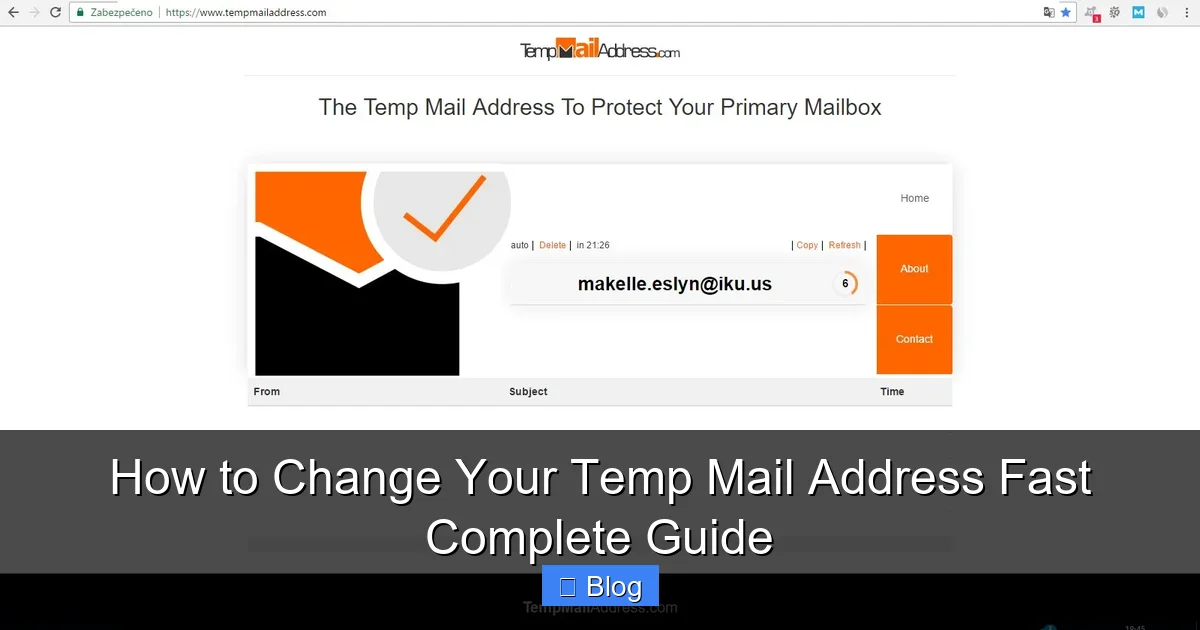
Before we dive into changing addresses, let’s clear up a common myth: temp mail isn’t magic. It’s just a clever trick using shared server resources. When you “create” a temp address, you’re not getting a unique inbox. Instead, you’re accessing a pool of addresses managed by the service. Think of it like a hotel lobby – many guests share the same front desk, but each gets their own mailbox.
Visual guide about How to Change Your Temp Mail Address Fast Complete Guide
Image source: d4.alternativeto.net
The 3-Second Address Generation
Here’s what happens when you visit a temp mail site:
- The service assigns you a random address (like purplemonkey@tempmail.net)
- Emails sent to that address route to a temporary storage bucket
- You view messages through the service’s web interface – no app needed
Changing your temp mail address simply means requesting a new random string from that pool. The old address? It keeps working until its timer runs out (usually 10 mins to 48 hours). This is why you can change addresses without losing access to previous emails – both coexist until expiration.
Why Services Make Changing So Easy
Temp mail providers actually want you to change addresses frequently. Why? Because:
- It reduces server load (fewer active addresses to manage)
- It prevents spam blacklisting of their domain
- It encourages habitual use (you come back to generate new ones)
That’s why you’ll rarely find a “change address” button buried in settings. It’s usually front-and-center. Some services even auto-refresh your address every 30 seconds if you’re idle. The whole system is designed for speed – which works perfectly for us!
Step-by-Step: How to Change Temp Mail Address on Top Services
Ready for the good stuff? Let’s walk through changing temp mail addresses on the most popular platforms. The process is nearly identical everywhere – just look for the refresh or “new address” button. I’ll show you exactly where to click.

Visual guide about How to Change Your Temp Mail Address Fast Complete Guide
Image source: i.pinimg.com
TempMail.org (The Easiest Method)
TempMail is the granddaddy of temp mail services. Here’s how to change your address:
- Go to temp-mail.org
- Your current address appears automatically (e.g., bluefox@tempmail.org)
- Click the circular arrow icon next to the address field
- Instantly get a fresh address like greenlion@tempmail.org
Pro Tip: On mobile, tap the address field first – the refresh button appears only when focused. You can change addresses unlimited times. Old emails remain accessible via the “Inbox” tab even after changing.
10MinuteMail.com (For Quick Swaps)
As the name suggests, these addresses last 10 minutes. Perfect for ultra-fast changes:
- Visit 10minutemail.com
- Address generates automatically (e.g., silvercat@10minutemail.com)
- Click “New” button below the address
- Get a new address in 2 seconds flat
Watch Out: The timer resets with each change. If you generate a new address at 9:59, you get a fresh 10 minutes. Handy for延长ing access when needed.
Guerrilla Mail (The Customizer)
Want to choose your own username? Guerrilla Mail lets you:
- Go to guerrillamail.com
- Type your preferred name in the “Set Email” field (e.g., mycustomname)
- Click “Set” to create mycustomname@guerrillamail.com
- To change, delete the name and click “Set” again
Fun Fact: You can even set a 1-hour expiration instead of the default 60 minutes. Just click “Options” before setting the address.
Other Services Quick Reference
- MailTemp.org: Click the “+” icon next to address field
- TempMail.io: Tap “New Address” button (mobile) or refresh icon (desktop)
- ThrowawayMail.com: Click “Generate New” below the address
See the pattern? It’s always one click. No logins. No confirmations. Just instant new addresses.
When Should You Change Your Temp Mail Address? (Critical Timing Tips)
Changing your temp mail address isn’t just about spam prevention – timing affects security too. Here’s exactly when to hit that refresh button:
Visual guide about How to Change Your Temp Mail Address Fast Complete Guide
Image source: mailjerry.com
After Every Single Use (Non-Negotiable)
Used your temp address to download a coupon? Change it immediately after. Signed up for a free trial? Swap it the second you get the confirmation email. Why? Because:
- Websites often send follow-up emails to the same address
- Hackers scrape temp mail domains for active addresses
- Some services reuse addresses after expiration (risky!)
I once kept the same temp address for a week “just in case.” Got 47 spam emails from a sketchy gaming site. Lesson learned: Change after every interaction.
Before Sensitive Actions
About to enter payment info for a free trial? Change your temp mail address first. Even if the site seems legit, you never know if they’ll sell your email. Better safe than sorry.
When You Suspect Compromise
Notice weird emails in your temp inbox? Like password reset requests for accounts you never made? That’s a red flag. Change your address immediately – someone might be probing for active temp mail.
The 24-Hour Rule
Even if you’re not actively using a temp address, change it every 24 hours if it’s still active. Most services auto-expire after this timeframe, but refreshing ensures you’re not stuck with a recycled address.
Security Pitfalls: What NOT to Do When Changing Temp Mail
Changing temp mail addresses is safe… if you do it right. Avoid these common mistakes:
Don’t Reuse Old Addresses
That temp address you used for Netflix last month? Don’t try to “reactivate” it by visiting the service again. Services like TempMail recycle addresses after expiration. You might accidentally access someone else’s inbox. Always generate a brand new address.
Never Click Links in Temp Mail
Got a “verify your account” email? Don’t click the link directly from your temp mail interface. Why? Some malicious sites track temp mail usage. Instead:
- Copy the verification link
- Paste it into a private browser window
- Complete the action there
This prevents the site from knowing you’re using temp mail.
Beware of “Address Locking” Scams
Some shady sites claim you need to “lock” your temp address to keep it active. Ignore this! Legit temp mail services don’t offer address locking. They’re trying to get you to disable ad blockers or download malware.
Don’t Use for Critical Accounts
Temp mail is great for newsletters and free downloads. But never use it for:
- Bank accounts
- Email recovery options
- Government services
If you lose access to the temp address (and you will when it expires), you’re locked out forever. Stick to low-stakes uses.
Advanced Tips: Changing Temp Mail Like a Pro
Ready to level up? These tricks save time and boost security:
Browser Extensions for 1-Click Changes
Install the TempMail extension for Chrome or Firefox. It adds a toolbar icon that:
- Generates new addresses with one click
- Auto-fills signup forms
- Shows inbox preview without leaving the page
I use it daily – saves me 20+ clicks per browsing session. Look for “Temp Mail” in your browser’s extension store.
Mobile Shortcuts
On iPhone or Android:
- Add your favorite temp mail site to your home screen
- Use the “New Tab” feature to instantly refresh
- Enable “Desktop Site” mode for full functionality
Pro move: Create a homescreen icon labeled “NEW TEMP” that opens directly to the address generator.
Combine with Privacy Tools
For maximum anonymity:
- Use temp mail + a VPN
- Pair with private browsing mode
- Clear cookies after each session
This creates a “digital fingerprint” that’s nearly impossible to track. I do this for all sensitive signups – feels like wearing an invisibility cloak online.
Track Expiration Times
Most services show how long your address remains active (e.g., “Expires in 47:22”). Note this when:
- Signing up for time-limited offers
- Waiting for important confirmations
- Using addresses for multi-step processes
When the timer dips below 5 minutes, generate a new address immediately.
Conclusion: Your Inbox Freedom Starts Now
Changing your temp mail address isn’t just a technical task – it’s an act of self-defense in today’s spam-filled internet. Remember: one click is all it takes to stay anonymous, avoid phishing traps, and keep your real inbox pristine. No more deleting hundreds of promotional emails. No more worrying about data breaches exposing your primary address.
You now know the exact steps for TempMail, 10MinuteMail, Guerrilla Mail, and others. You understand when to change addresses (after every use!) and how to avoid security pitfalls. You’ve got pro tips for browser extensions and mobile shortcuts. This isn’t just about convenience – it’s about taking back control of your digital life.
So next time you’re about to hand over your email for a free download or forum signup, pause. Open your favorite temp mail service. Click that refresh button. Feel that rush of privacy? That’s the sound of spam hitting the delete button. Your future self will thank you when their inbox stays clean and their identity stays safe. Go change that temp mail address right now – your digital freedom awaits!
Frequently Asked Questions
Can I change my temp mail address without losing previous emails?
Yes! Changing your temp mail address creates a brand new inbox while keeping the old one active until expiration. You can still access all previous emails through the service’s inbox interface. Both addresses work independently during their active periods.
How many times can I change my temp mail address?
Most services allow unlimited changes – you can generate a new address as often as you want. Some platforms like 10MinuteMail reset the expiration timer with each change, giving you more flexibility. There are rarely restrictions on frequency.
Is it safe to use the same temp mail address multiple times?
Not recommended. Reusing addresses increases spam exposure and security risks. If a website leaks your temp address, spammers will target it repeatedly. Always generate a fresh address for each new signup or interaction for maximum protection.
What happens to my temp mail address after I change it?
Your old address continues working until its expiration timer runs out (typically 10 minutes to 48 hours). During this time, emails sent to the old address still appear in your inbox. The new address operates independently with its own expiration clock.
Can I customize my temp mail address when changing it?
Some services like Guerrilla Mail let you choose custom usernames (e.g., yourname@guerrillamail.com). Others generate random addresses automatically. Check the “Options” or “Settings” section before changing – many services offer customization features.
Do temp mail services notify senders when I change addresses?
No. Changing your temp mail address is completely invisible to senders. They’ll continue sending emails to the old address until it expires, with no indication you’ve generated a new one. This makes temp mail ideal for discreet communications.